Google AI Edge Eloquent Review: On-Device Speech Recognition Without the Subscription Tax
Google dropped a new app on the iOS App Store on April 7, 2026, with zero fanfare. No press release. No product keynote. No tweet from a VP. Just a quiet listing under the “Google AI Edge” developer umbrella: an app called Eloquent.
That low-key launch is itself a signal worth reading carefully. This is not a consumer product rollout. It is a field test, and the fact that it landed on iOS before Android – the opposite of Google’s standard playbook – makes it even more unusual.
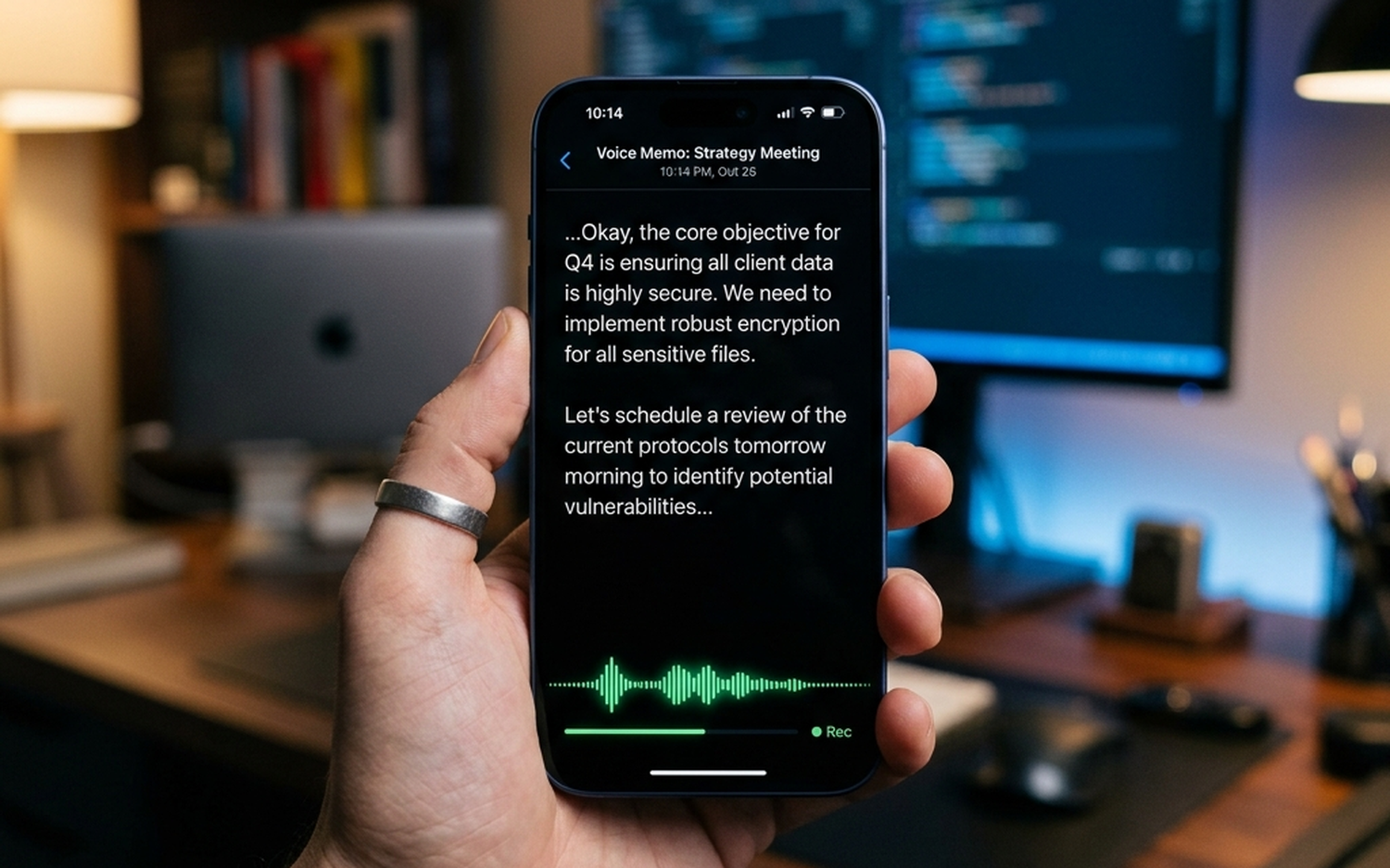
What Eloquent does is straightforward: it records your voice, transcribes it in real time using an on-device AI model, strips out filler words automatically, and gives you four text rewrite modes to reshape the output. The entire core workflow runs locally on your phone, with no audio ever sent to a server unless you explicitly opt in.
The model doing the heavy lifting is Gemma ASR, part of Google’s Gemma family of compact, edge-optimized models. Gemma ASR runs through the Google AI Edge SDK, the same developer toolkit designed to deploy AI workloads directly on Android and iOS hardware. Modern smartphones carry dedicated Neural Processing Units (NPUs) precisely for this kind of task, keeping inference fast without punishing battery life.
The app is completely free. No subscription tier. No usage cap. No “premium” paywall blocking the rewrite tools.
For context: Wispr Flow charges approximately $15 per month for a comparable feature set, and it routes most processing through the cloud. Dragon Anywhere, the professional dictation standard, runs on an expensive subscription and is heavily cloud-dependent. Eloquent’s pricing model – or rather, the absence of one – is the first thing that demands attention.
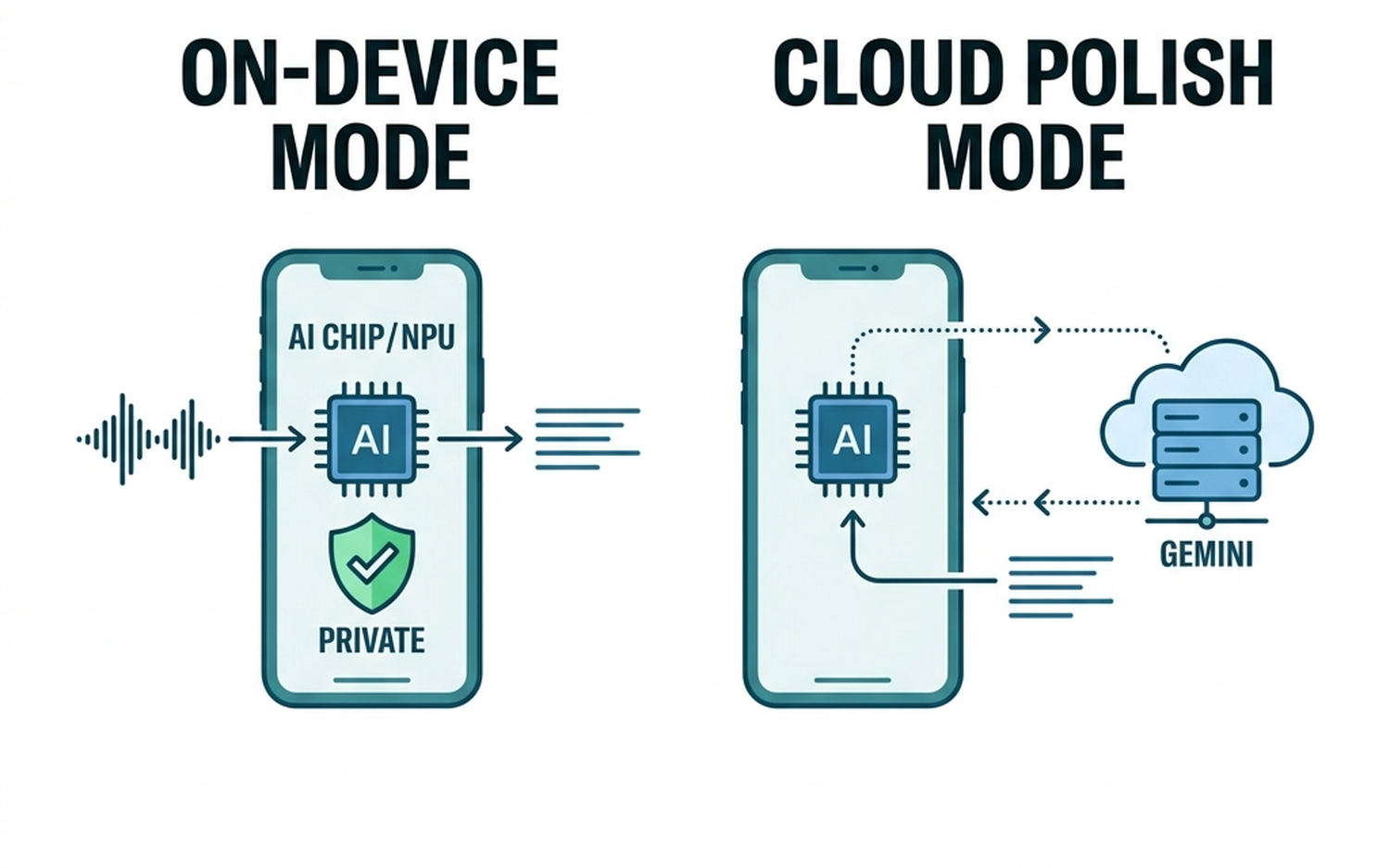
The optional cloud mode is worth noting precisely because of how it is scoped. When enabled, speech recognition still stays on-device. Only the text polishing step, handled by Google’s cloud-based Gemini model, goes off-device. That is a meaningful architectural distinction: your raw audio and initial transcript never leave the phone regardless of which mode you choose.
For professionals handling sensitive conversations, legal discussions, or medical notes, that default privacy posture matters more than any feature list. Our analysis of Apple Intelligence’s privacy architecture covers why on-device processing is increasingly the baseline expectation, not a premium differentiator.
The iOS-first launch strategy is the clearest indicator that Google is treating Eloquent as a probe rather than a product. Historically, Google ships to Pixel and Android first, then considers iOS. Reversing that order suggests the team wants real-world usage data from a broader, more diverse hardware base before committing to a full release cycle. Android support is confirmed but carries no announced date.
What follows is a section-by-section breakdown of every feature, a direct comparison against the strongest competing apps, and a clear verdict on who should actually use this.
What Is Google AI Edge Eloquent and Why Does It Matter?
A Quiet Launch That Changes the Price of On-Device Transcription
The April 7, 2026 App Store listing for Eloquent arrived without a single official communication from Google. No I/O stage reveal. No Pixel feature drop. No blog post from the Google AI team. For a company that typically orchestrates product announcements with considerable precision, that silence is a deliberate choice, not an oversight.
Eloquent sits under the Google AI Edge brand, which is a developer-facing ecosystem, not a consumer product line. This matters because it reframes expectations: Eloquent is closer to a live field experiment than a finished product. Google is collecting real-world performance data across diverse iOS hardware before committing to a full release cycle.
The pricing structure is where the competitive disruption becomes concrete. Wispr Flow (now rebranded as Willow) charges approximately $15 per month and routes most processing through the cloud. SuperWhisper carries an annual subscription and is primarily Mac-focused. Dragon Anywhere, the professional dictation standard, is cloud-heavy and expensive. Eloquent is completely free, with no usage caps and no features locked behind a paywall.
That is not a promotional price. There is no indication of a future subscription tier. Every rewrite tool, the history tab, the custom vocabulary system, all of it is available at zero cost from day one.
For paid competitors, this is a structural problem, not a temporary one.
What Is Google AI Edge and the Gemma ASR Model?
Google AI Edge is a developer platform built to run AI models directly on Android and iOS devices, using the device’s own processing hardware rather than remote servers. The SDK gives developers the tools to deploy compact AI models at the edge, meaning on the phone itself, rather than offloading computation to the cloud.
Eloquent’s transcription engine is Gemma ASR, a compact automatic speech recognition model from Google’s Gemma family. Gemma ASR is specifically optimized for edge deployment: it runs on the smartphone’s dedicated Neural Processing Unit (NPU), which handles AI inference efficiently without the battery drain associated with CPU-based processing.
The practical result is that your audio never leaves the device in default mode. The raw recording, the intermediate transcript, the filler-word cleanup – all of it happens locally.
This positions Eloquent within a broader industry shift. Apple, Samsung, and Qualcomm are all aggressively moving AI workloads to device hardware for the same reasons: lower latency, reduced infrastructure costs, and stronger privacy guarantees. Our review of AI voice input tools as a category covers how this shift is reshaping user expectations around what “private by default” actually means in practice.
For users handling sensitive professional content, the on-device default is not a minor feature. It is the architecture.
Core Features and Real-World Workflow
The Transcription Pipeline: From Voice to Clean Text in Seconds
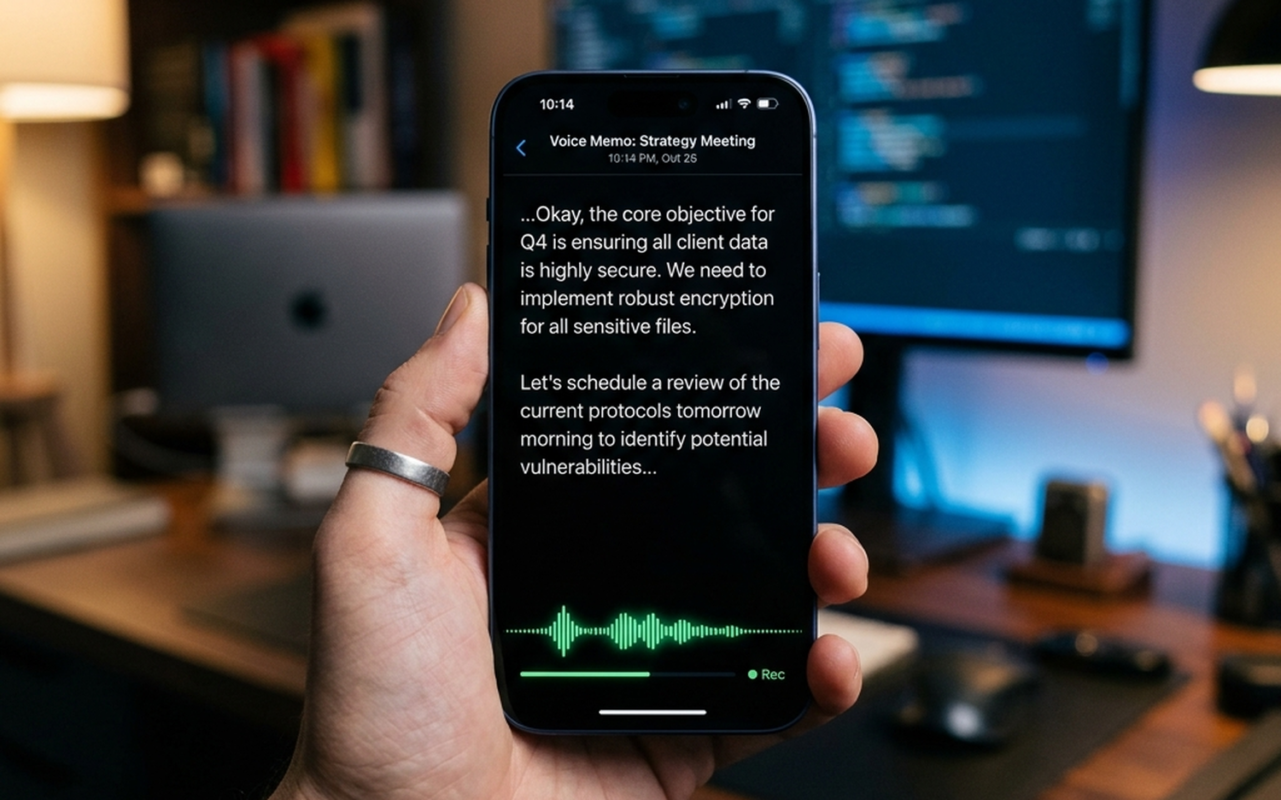
The workflow is deliberately minimal. Open Eloquent and the app immediately activates the microphone with a live waveform display – no tap-to-start, no mode selection required. Speak, and text generates in near-real-time directly beneath the waveform.
When you pause or stop recording, Gemma ASR runs a post-processing pass on the local transcript. This is where the cleanup happens: filler words (“um”, “uh”, “like”, “you know”) are stripped automatically, and sentence structure is normalized to read as intentional prose rather than raw speech. The result copies to your clipboard without any additional tap.
The critical technical detail here is that none of this involves a network request. There is no cloud round-trip between your voice and the cleaned transcript. The Gemma ASR model runs entirely on the device’s NPU, which means latency is determined by your hardware, not your Wi-Fi signal. In practice, the filler-word cleanup completes within one to two seconds of stopping speech on current-generation iPhones.
For users who have worked with cloud-dependent transcription tools, the absence of that 3-to-8 second processing delay is immediately noticeable.
The history tab stores every session with timestamps, and individual entries can be deleted. Usage statistics (total word count, average words-per-minute) are tracked per session, which gives productivity-focused users a concrete metric to monitor over time.
Four Rewrite Modes and Personalized Vocabulary
After transcription, four post-processing modes become available. Each serves a distinct content type:
Key Points converts a spoken passage into a bullet-point summary. The most practical application is meeting notes or lecture capture, where the raw transcript is too verbose to be useful but the structure of the original speech matters.
Formal rewrites casual spoken language into professional register. A rambling verbal explanation of a project update becomes a coherent paragraph suitable for an email or report. This is the mode most likely to save time for knowledge workers who dictate first and edit second.
Short compresses content aggressively. Useful when a long verbal explanation needs to become a single-sentence summary or a brief Slack message.
Long expands brief spoken notes into fuller documents. Dictate a rough three-sentence idea and the mode produces a structured paragraph with added context.
These four modes operate in cloud mode by default when text rewriting is involved, using Gemini for the rewrite pass. The transcription itself remains on-device regardless of which mode you select.
The personalized vocabulary system addresses a persistent weakness in general-purpose ASR: proper nouns and domain-specific terminology. Users can manually add terms (product names, medical terminology, client names, technical acronyms) to a custom dictionary that Gemma ASR references during recognition. Optionally, the app can scan recent Gmail messages to identify high-frequency terms and suggest additions. This Gmail integration is the only point of contact with a Google account, and it is entirely opt-in with no persistent data access.
For context on how vocabulary customization compares across the broader category of AI voice input tools, our breakdown of AI voice keyboard tools covers how competing apps handle domain-specific recognition.
Privacy Model – On-Device Default vs. Cloud-Enhanced Mode
How the Hybrid Privacy Architecture Works
Eloquent operates across two distinct processing modes, and understanding exactly what data moves in each is essential before trusting it with sensitive content.
Mode 1: Default On-Device Processing
In the default configuration, the Gemma ASR model runs entirely on the device’s Neural Processing Unit. Audio is captured, processed, and converted to text without any network activity. The raw audio never leaves the phone. The transcript never leaves the phone. No session metadata, no usage telemetry, and no personal identifiers are transmitted to Google’s servers.
This makes the default mode genuinely suitable for confidential use cases: legal dictation, medical notes, financial discussions, or any meeting where recording and cloud-uploading audio would create compliance or liability exposure.
Mode 2: Cloud-Enhanced (Opt-In Only)
When the user explicitly enables cloud mode, the processing split works as follows: speech recognition still runs locally via Gemma ASR, producing a raw transcript on-device. That text transcript (not the audio) is then sent to Google’s cloud-hosted Gemini model for the polishing and rewrite pass.
The practical implication is that even in cloud mode, your voice recording never leaves the device. Only the text output does. This is a meaningfully different privacy posture than services that upload raw audio.
How Competitors Handle This
Wispr Flow and Willow both upload full audio to cloud servers by default to perform recognition and rewriting. Users who want privacy must either pay for a premium tier or accept that their spoken content is processed remotely. SuperWhisper keeps processing local, which is a genuine privacy advantage, but it requires an annual subscription.
Eloquent’s default-on-device approach with opt-in cloud polishing sits in a more defensible position than most free alternatives.
[IMAGE: Diagram illustrating the two privacy modes – on-device-only vs. hybrid cloud polish]
The Airplane Mode Test
The most reliable way to confirm on-device operation is straightforward: enable Airplane Mode, open Eloquent, and record a passage. If transcription completes and the cleaned text appears without an error or connectivity prompt, the processing is genuinely local. On current-generation iPhones, this test passes without issue in default mode. Cloud mode, predictably, fails to complete the rewrite pass without a connection, which confirms the architecture behaves exactly as described.
For users evaluating device requirements for running on-device AI reliably, hardware generation matters here: NPU performance on iPhone 15 and later handles Gemma ASR without noticeable latency or thermal throttling.
Head-to-Head: How Eloquent Stacks Up
| App | Platform | On-Device Processing | Free Tier | Rewrite Tools | Custom Vocabulary | Best For |
|---|---|---|---|---|---|---|
| Google Eloquent | iOS (Android TBA) | Yes (Gemma ASR, NPU) | Yes, unlimited | 4 modes (Key Points, Formal, Short, Long) | Yes (manual + Gmail import, opt-in) | Free, privacy-first iOS users |
| SuperWhisper | macOS, iOS | Yes (Whisper model) | No (paid subscription) | Limited | No | Mac-first power users, privacy-focused |
| Whisper Notes | iOS | Yes (OpenAI Whisper) | Yes (limited) | None | No | Simple offline transcription on iOS |
| Google Recorder | Android (Pixel-first) | Yes (on-device ASR) | Yes, unlimited | None | No | Android users needing clean transcripts |
| Wispr Flow / Willow | iOS, macOS | No (cloud upload) | No (~$15/month) | Yes (cloud-powered) | Limited | Professionals already paying for cloud tools |
| VoiceScriber | iOS | Yes (full offline) | Yes | Basic | No | Home-screen widget fans, strict offline use |
| Aiko | iOS, macOS | Yes (Whisper model) | Yes (limited) | None | No | Batch audio file transcription |
Comparison Verdict
Best for privacy-first users: Google Eloquent in default mode and VoiceScriber are the only free options where audio never leaves the device and no account is required. Eloquent edges ahead because its Gemma ASR model is more accurate on conversational speech than the Whisper variants powering Aiko and Whisper Notes.
Best free option overall: Eloquent, without a close second. It is the only free app in this group that combines on-device transcription, filler-word cleanup, four rewrite modes, and a custom vocabulary system with no usage cap.
Best for professionals: Wispr Flow remains the choice for users who need deep system integration (dictating into any app, not just a standalone recorder) and are willing to pay for it. Eloquent does not yet offer system-wide dictation.
Best for iOS: Eloquent, assuming you are on iPhone 15 or later where NPU performance handles Gemma ASR without latency. For older hardware, Aiko’s lighter Whisper model may run more smoothly.
Best for Android: Google Recorder remains the default recommendation until Eloquent’s Android release ships. It offers excellent on-device transcription but lacks any rewrite tooling. Android users who want the full Eloquent feature set will need to wait, and there is currently no confirmed timeline.
Who should skip Eloquent entirely: Anyone who needs system-wide dictation across third-party apps, or who requires real-time speaker diarization for multi-person meetings. Those use cases still point to cloud-first tools or dedicated meeting transcription platforms.
Who Should Use Eloquent? Final Verdict
Best Use Cases for Eloquent Right Now
Privacy-sensitive professionals are the most obvious beneficiaries. A lawyer dictating case notes between client meetings cannot afford to have spoken content routed through a third-party server. With Eloquent in default mode, the audio never leaves the device. A practical workflow: dictate a 3-minute summary after a client call, hit “Formal” rewrite, and paste the cleaned text directly into case management software. No cloud exposure, no subscription invoice.
Productivity users who dictate rather than type get the most out of the four rewrite modes. The workflow here is fast: speak a rough brain dump of a meeting’s action items, let Eloquent strip the filler words, then hit “Key Points” to generate a clean bullet list. What would take 10 minutes of manual editing compresses to under 60 seconds. For email drafts, the “Short” mode is particularly useful for trimming rambling voice input into something sendable.
Students and researchers benefit from the “Key Points” mode during literature review or lecture capture. Record a verbal summary of a paper you just read, and the output is a structured bullet list ready to paste into a notes app. The custom vocabulary feature is genuinely useful here: add discipline-specific terminology once, and Gemma ASR stops misreading “phenotype” as “feign type.”
Caveats and Who Should Wait
Three honest limitations deserve direct attention before you commit to Eloquent as a core tool.
iOS-only, for now. This is the most glaring gap. Eloquent is a Google product running on Google’s Gemma ASR model, and it launched on Apple’s platform first. Android users have no confirmed release date. That is not a minor inconvenience for the majority of Google’s own user base.
No speaker diarization. Eloquent cannot distinguish between multiple voices. Record a two-person conversation and you get a single undifferentiated transcript. For meeting transcription involving more than one speaker, it falls short of dedicated tools.
Pricing is not guaranteed. The app is currently free with no usage cap, but it sits under the Google AI Edge developer umbrella, not a consumer product line. “Free during testing” has a history of becoming “freemium at launch.” There is no stated pricing commitment.
For Android users waiting on the full Eloquent experience, the current gap in Google’s own ecosystem is worth noting. While you wait, our Samsung Galaxy S26 Ultra review covers how Android’s on-device AI stack is developing more broadly, including what Google’s own Pixel-native tools currently offer.
For iPhone users: download it now. The combination of zero cost, genuine on-device processing, and functional rewrite tools is not matched by anything else free on iOS. Just treat the pricing model as provisional until Google makes a formal product commitment.
- Free with no usage caps.
- On-device processing for enhanced privacy.
- Four useful rewrite modes.
- Currently iOS-only.
- No speaker diarization.
- Pricing model not guaranteed.
Frequently Asked Questions
What is Google AI Edge Eloquent?
It’s an iOS app that transcribes voice to text in real-time using an on-device AI model (Gemma ASR). It also offers text rewrite modes and filler word removal.
How much does Eloquent cost?
Eloquent is completely free with no subscription fees, usage caps, or paywalls.
Does Eloquent process data in the cloud?
By default, all processing happens on-device. An optional cloud mode uses Google’s Gemini model for text polishing, but the raw audio and initial transcript remain on the device.
What is Google AI Edge?
Google AI Edge is a developer platform designed to run AI models directly on devices, utilizing the device’s processing hardware instead of remote servers.
What are the four rewrite modes in Eloquent?
The four rewrite modes are Key Points (bullet-point summary), Formal (professional register), Short (compressed content), and Long (expanded content).
Is Eloquent available on Android?
Not yet. Eloquent launched as an iOS-only app in April 2026. An Android version is confirmed to be in development, but no release date has been announced. Android users can use Google Recorder on Pixel devices as a free alternative in the meantime.