

The Beelink SER9 Max makes the most sense as a compact desktop for someone who already uses fast network storage, or plans to build that workflow. Its appeal is the combination of upgradeable storage, useful display connections and 10GbE. Paying extra simply because a listing mentions a PCIe 5.0 SSD is a weaker reason.
The distinction matters because SER9 Max is a family name, not a complete configuration. Start with the processor and installed drive, then decide whether the connections solve a problem at your desk.

Identify the configuration before comparing results
Beelink’s US listing includes Ryzen 7 H 255 and Ryzen AI 7 H 350 options, with 32GB or 64GB DDR5 configurations. The processor name belongs on your comparison sheet alongside the price. A retailer headline saying only “SER9 Max” leaves too much unspecified.
For the underlying Ryzen AI 7 350, AMD lists eight cores, 16 threads, up to 5.0GHz boost and Radeon 860M graphics. Those are processor capabilities, not a promise that every application or game will run at a particular speed.
There is a concrete reason to check the drive too. Clubic’s H 255 review unit contained a 1TB Crucial P3 Plus. The newer MyDrivers H 350 sample used a 1TB PC550. Results for one installed SSD do not describe the other.
| Check on the exact listing | Why it changes the decision |
|---|---|
| Full CPU name, including H 255 or H 350 | Prevents treating different processors as one benchmark result |
| Installed RAM capacity and module arrangement | Determines whether an upgrade replaces memory or adds to it |
| SSD model and capacity | Identifies which storage results are relevant |
| Available internal slot and installation requirements | Helps plan a second drive before ordering it |
| Delivered price and warranty for that configuration | Makes the comparison about the machine you will actually receive |
Our recommendation is to compare complete configurations, rather than paying for the “Max” suffix. If a seller specifies only capacity, treat the SSD model as unspecified instead of assuming it matches a review sample.
A Gen 5 SSD does not make this a Gen 5 storage platform
Beelink specifies two M.2 2280 PCIe 4.0 x4 slots. The PC550 in the MyDrivers sample supports PCIe 5.0, but the reviewer explicitly says it operated at PCIe 4.0 x4 in this machine. The installed drive’s label and the host connection are different specifications.
Drive generation versus slot generation
A compatible newer drive can run through an older connection. In this SER9 Max, the PCIe 4.0 slot sets the connection ceiling even when the installed SSD supports PCIe 5.0.
Choose an upgrade for useful capacity, price and the drive’s behavior in this system. Do not pay a premium expecting PCIe 5.0 link speeds here.
This gives buyers two sensible paths. Keep the supplied SSD if it accommodates the operating system and active projects. Consider a second compatible drive when separating project storage from the system drive would make organization easier. Neither choice requires chasing the highest generation number on the box.
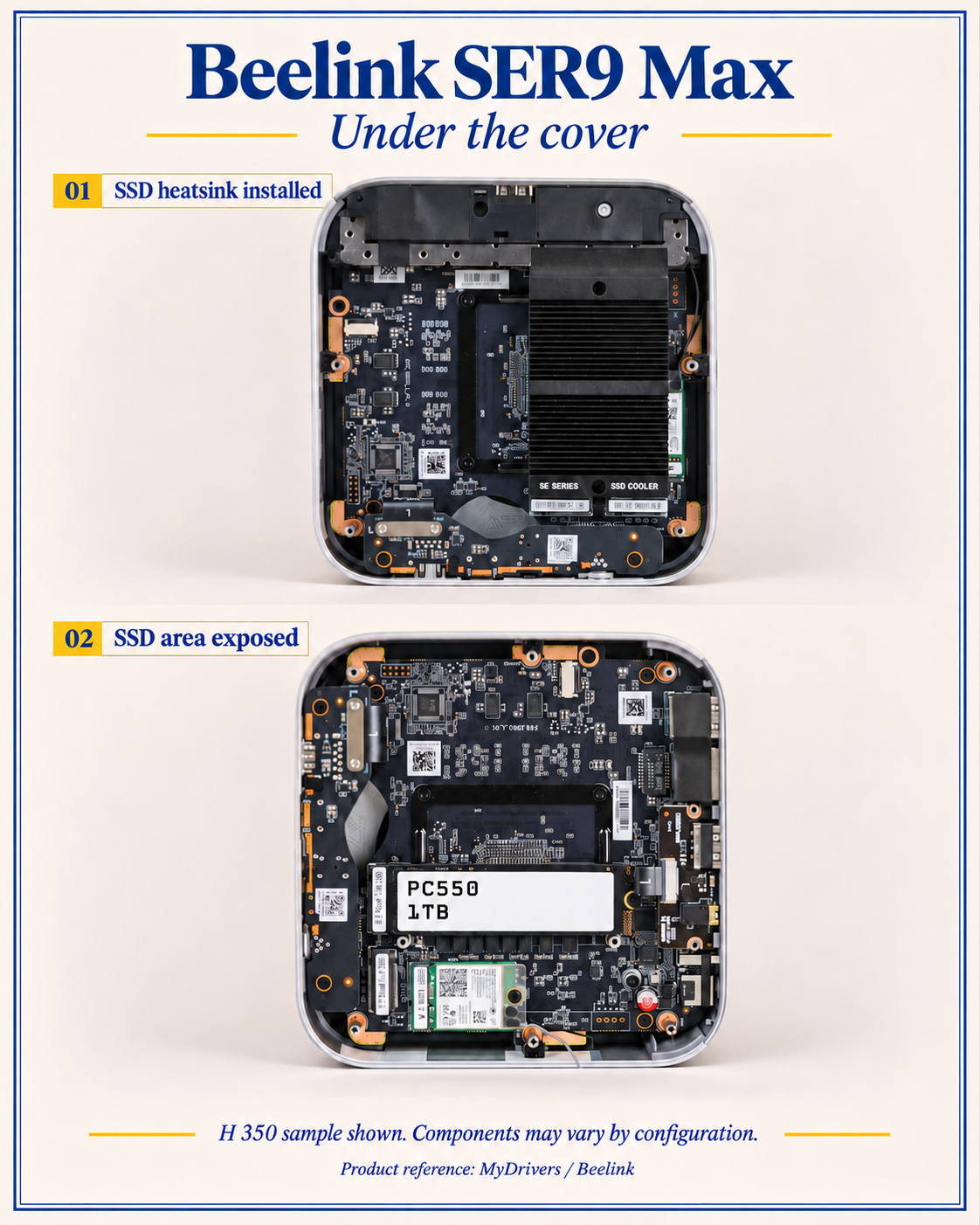
Before opening the case, check the instructions for your configuration and inspect the available clearance. Clubic’s teardown of its H 255 sample shows a storage heatsink and nearby Wi-Fi antenna wiring. That is a useful reminder to plan the physical installation, not a reason to assume every shipping configuration contains identical parts.
What the reported 42°C actually tells you
In its H 350 sample, MyDrivers reports 7,106MB/s sequential reads and 6,890MB/s writes in CrystalDiskMark. Its high-load thermal observations put the SSD controller at 42°C and flash at 36°C. These are attributed results for that PC550-equipped machine, not measurements of the SER9 Max family as a whole.
The report’s teardown also shows a storage heatsink. Its prose does not fully establish ambient temperature, load duration or the exact cooling arrangement during the SSD temperature measurement. Consequently, the 42°C number is useful evidence about that sample, but it cannot establish a universal fanless, heatsink-free or sustained-performance guarantee.
For a buyer, the useful conclusion is narrower: this sample produced fast local storage results while operating through a Gen 4 connection. It does not follow that replacing a working drive with any Gen 5 model will reproduce its temperature. Drive selection, installation and workload still need to match the intended job.
When 10GbE is worth paying for
Beelink lists a 10Gbps Ethernet port. That makes the SER9 Max interesting as a desktop working with files on a capable NAS or another workstation. It does not make an ordinary internet connection ten times faster.
The following figures are calculated line-rate ceilings, using eight bits per byte and decimal units. They exclude protocol overhead and are not measured SER9 Max transfer speeds.
| Slowest network link in the transfer path | Calculated ceiling before overhead | Ideal time for a 100GB transfer |
|---|---|---|
| 1Gbps | 125MB/s | 800 seconds |
| 2.5Gbps | 312.5MB/s | 320 seconds |
| 10Gbps | 1,250MB/s | 80 seconds |
The comparison explains where the investment can matter. If both endpoints and the intervening equipment can support the faster path, moving large project folders becomes a plausible reason to buy this machine. If your NAS or switch remains on a slower connection, the desktop’s faster port alone cannot deliver the final row.
Intel’s throughput troubleshooting guidance separates network-interface testing from file-copy testing and identifies storage at either endpoint as a possible bottleneck. It recommends tools such as iperf and NTttcp for assessing the network path. This is general diagnostic guidance, not evidence that the Beelink uses an Intel Ethernet controller.
Use that distinction to decide where to spend:
- Check the negotiated link speeds along the route to your storage.
- Measure the network path separately from a disk copy.
- Copy a representative project and compare the result with the network test.
- Upgrade the part that limits your real workload, rather than automatically replacing the desktop SSD.
For scale, even the calculated 10GbE ceiling is well below the sample’s reported sequential SSD read result. That does not predict a real copy speed, but it does show why a faster local SSD is not automatically the next useful network upgrade.
Plan the desk around connections, not just the small box
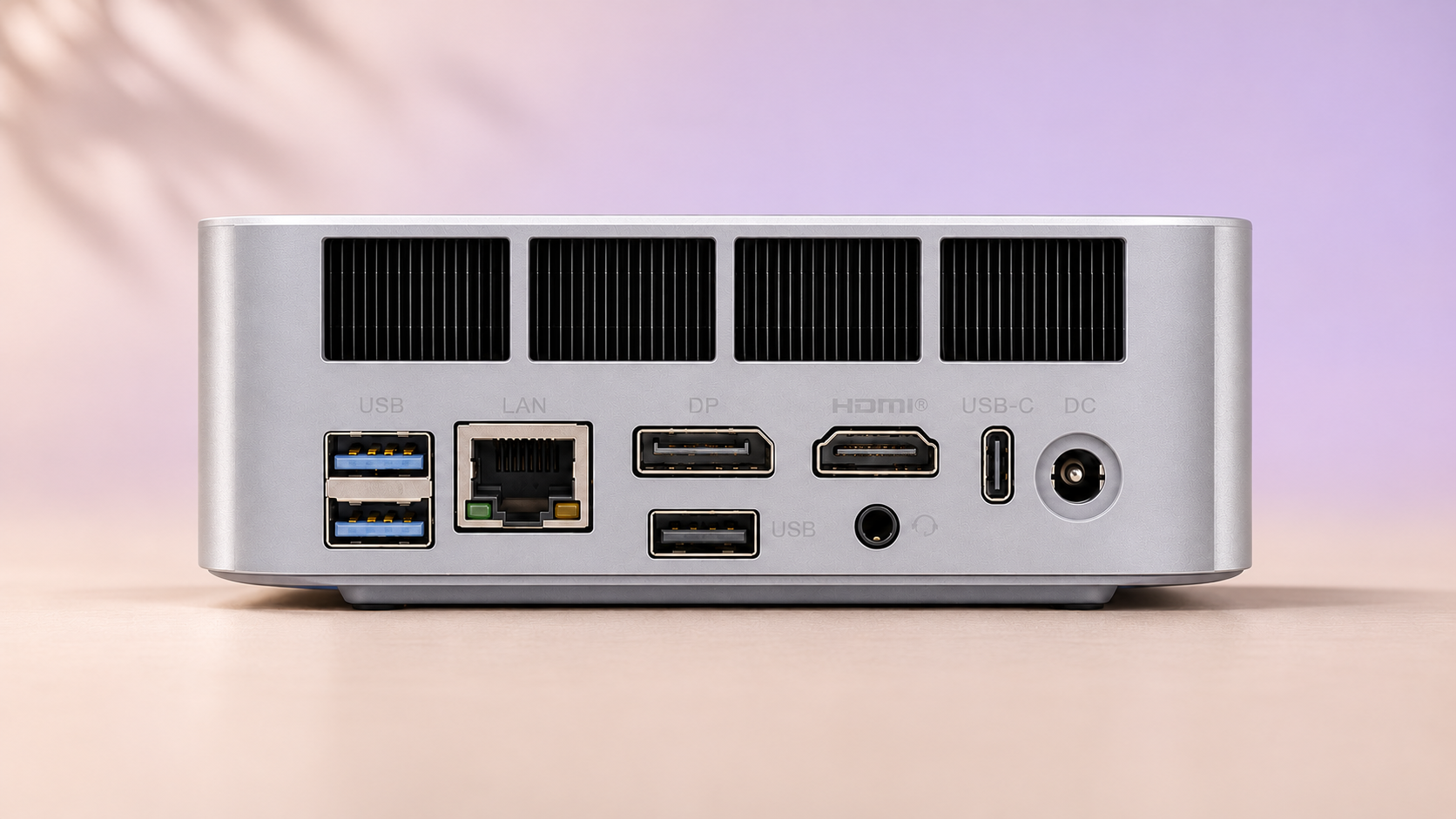
The manufacturer’s connection list includes HDMI 2.1, DisplayPort and a 40Gbps USB4 port. These offer useful options for arranging displays and peripherals, but the monitor, cable and chosen port must be considered together. A headline maximum refresh rate is not a guarantee for every output combination.
A network storage workflow and a directly attached drive also solve different problems. If the storage will serve only this desk, compare a direct connection before buying a faster switch and upgrading another computer. Our LaCie 8big Pro5 article explores the direct-attached storage alternative. Its Thunderbolt 5 focus should not be read as a claim that the SER9 Max has a Thunderbolt 5 port.
Keep the rest of the desktop budget visible: display, keyboard, pointing device and whichever network equipment the workload needs. A compact computer is most useful when the whole setup fits the task, not merely when the chassis looks tidy.
Who should choose the SER9 Max?
Shortlist it for a connected workspace: you need a small Windows desktop, want room to expand internal storage and have a specific use for fast wired networking. The configuration checklist and separate network test above provide a practical way to evaluate that purchase.
Be more selective for gaming or basic office work: require results for the exact processor, memory configuration, games and settings you care about before assigning a gaming budget. For browser work and documents, a lower-cost alternative deserves consideration if the SER9 Max’s connections would go unused.
Robtech’s English video covers the Ryzen AI 7 350 version and offers an additional configuration-specific resource. Keep its sample distinct from the PC550-equipped unit discussed above.
The buying verdict is straightforward: choose the SER9 Max for a useful combination of connections and expansion, then verify the exact configuration. Treat the cool-running SSD result as one sample’s evidence. The best upgrade is the one that removes your actual bottleneck, not the one with the newest PCIe label.
- 10GbE provides headroom for a suitably equipped storage network
- Two M.2 slots offer an internal storage expansion path
- HDMI, DisplayPort and USB4 provide flexible desk connections
- The family name does not identify the CPU or installed SSD
- A Gen 5 SSD still runs through a Gen 4 slot
- Fast networking requires capable equipment at both ends