

Search interest in the best iPhoto plugins has never really died, yet the software those plugins were built for has been gone for years. If you have landed here hoping to bolt new features onto Apple iPhoto, the honest answer matters more than a recycled list of dead downloads. This guide explains what happened to iPhoto, which classic add-ons still have a purpose, and the modern Mac apps that now do the same jobs far better.
We rebuilt this article from the ground up for 2026 because the old advice is actively misleading. Half the plugins people still search for will not even launch on a current Mac. The other half were quietly replaced by standalone apps that are faster, safer, and still maintained. Here is the version that actually helps.
What Happened to iPhoto After Apple Discontinued It?
Apple announced the end of iPhoto on June 27, 2014, and shipped its replacement, the Photos app, inside OS X 10.10.3 on April 8, 2015. iPhoto had been in use since 2002, so the switch surprised a lot of long time Mac users. According to Apple, the new Photos app would take over for both iPhoto and the professional Aperture tool.
The difference between iPhoto and the Apple Photos app is bigger than a new icon. Photos drops the old Events model in favor of automatic Moments and manual albums, and it puts iCloud sync at the center of everything. In practice, that means your library is designed to live across every device rather than on one Mac. Worth noting: when Photos migrates an old library, books and slideshows survive only as plain albums, and their custom text and layouts are lost.
The part that breaks every classic plugin is quieter. Photos removed the export plug-in architecture that iPhoto exposed, and later versions stripped the sharing extensions too. That single change is why almost nothing from a 2012 plugin roundup installs today.
Do iPhoto plugins still work in 2026?
Mostly no. iPhoto was discontinued in 2015 and the Photos app removed its plugin system, so today the job is done by standalone apps you run next to Photos.
Retired April 2015, replaced by the Photos app in OS X 10.10.3.
The export plugin and sharing extension API is gone from Photos.
Stopped working in macOS Catalina (2019), so old plugins fail on Apple Silicon.
Standalone apps such as PowerPhotos and Duplicate Annihilator for Photos.
How iPhoto Plugins Actually Worked and What They Could Do
Understanding how iPhoto plugins worked explains why the replacements look so different. iPhoto exposed an export plug-in system, so most add-ons appeared inside the export sheet. You picked your photos, opened Export, and a tab from a third party (Flickr, Facebook, a watermark tool) handled the upload or transformation. A second group of tools, like library managers, worked outside iPhoto entirely by reorganizing the library package on disk.
That split is the key to choosing a modern tool. Anything that lived in the export sheet is simply gone, because Photos has no export tab to plug into. Anything that worked on the library files themselves still has a modern equivalent, because the library is still just a package on your drive. If you shoot most of your photos on a phone these days, the same logic applies to the libraries feeding in from devices like the Oppo Find X9 Ultra camera system or a pocket camera.
What people actually used iPhoto plugins for
Nearly every classic add-on fell into one of four buckets. Knowing your bucket tells you exactly which 2026 tool to install.
iPhoto Library Manager and iPhoto Buddy split, merged, and switched libraries. Now handled by PowerPhotos.
Duplicate Annihilator scanned for repeats. It still ships in a Photos app version today.
FlickrExport, PictureSync, and FFXporter pushed to Flickr. All retired with the export sheet.
Impression stamped copyright marks on export. Now a job for standalone watermark apps.
The Best iPhoto Plugins and Their 2026 Replacements
Here is the original cast of popular plugins, what each one did, and the tool that replaces it today. The pattern is consistent: the library and cleanup tools have strong modern successors, while the export plugins have no direct replacement because Apple closed the door they used.
| Classic iPhoto plugin | What it did | Status in 2026 | Modern replacement | Typical price |
|---|---|---|---|---|
| iPhoto Library Manager | Multiple libraries, merge, rebuild | Retired by developer | PowerPhotos | 39.95 dollars |
| iPhoto Buddy | Create and switch libraries | Abandoned | PowerPhotos (free tier) | Free to 39.95 dollars |
| Duplicate Annihilator | Find and remove duplicates | Updated for Photos | Duplicate Annihilator for Photos | 7.95 dollars |
| Impression | Add watermarks on export | Abandoned as plugin | Standalone watermark apps | Varies |
| FlickrExport / PictureSync / FFXporter | Upload to Flickr | Dead with export sheet | Flickr Auto-Uploadr | Pro account |
| iPhoto Diet | Trim cache and backups | Obsolete | Photos manages this itself | Free |
The takeaway is simple. Spend your money where the work is still hard for Apple to do on its own, which means library surgery and duplicate cleanup. Everything else is now either built into Photos or handled by a general purpose app.
iPhoto Library Manager vs iPhoto Buddy: Which Is Better?
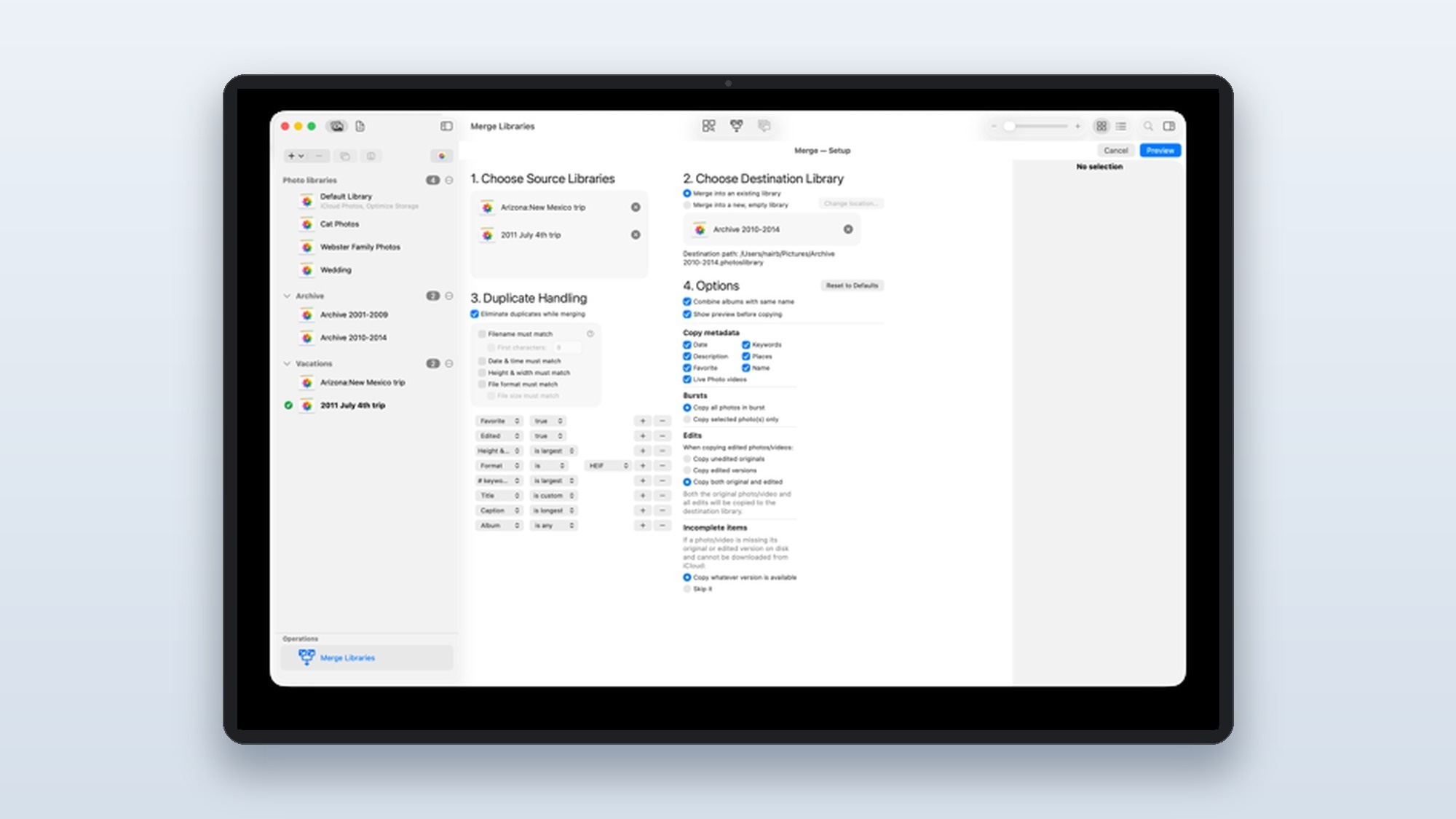
This is the comparison that still gets asked, so it deserves a clear answer. iPhoto Library Manager was always the more powerful of the two. It created and managed multiple libraries across internal, external, or shared storage, and crucially it could rebuild corrupted libraries, extract images from damaged ones, and merge libraries while keeping albums intact. iPhoto Buddy was lighter and free, but it mostly created new libraries and let you switch between them without opening iPhoto first.
So iPhoto Library Manager wins on capability, and iPhoto Buddy wins on price and simplicity. In reality, that debate is settled now, because both are obsolete. The developer behind iPhoto Library Manager, Fat Cat Software, retired it and built PowerPhotos as the successor for the modern Photos app. According to the developer, PowerPhotos carries over the merge, split, and library repair features that made iPhoto Library Manager worth its 29.95 dollar price, and adds side by side duplicate comparison plus, in PowerPhotos 3, batch metadata editing. Their own comparison page lays out the upgrade path.
If you are moving over from an old iPhoto setup, the safe path is to let PowerPhotos open your existing libraries first, confirm everything imported, and only then merge. According to Fat Cat Software, the app never alters your original photos during a merge, which is the reassurance most long time iPhoto users want before they commit. The quick comparison below breaks down how the three tools stack up.
iPhoto Library Manager vs iPhoto Buddy vs PowerPhotos
All three answer the same question, how do I run more than one photo library, but only one of them is safe to install today.
Powerful merge, rebuild, and multi library control. Retired, will not open a Photos library.
Free and simple library switching only. Abandoned, no Photos support.
Merge, split, repair, and duplicate finding for the current Photos app. Free 2.0 tier, 39.95 dollars full.
PowerPhotos, because it is the only one Apple Silicon Macs can actually run.
How to Remove Duplicate Photos From an iPhoto or Photos Library
Learning how to remove duplicate photos from an iPhoto library is the single most common reason people went looking for plugins, and it is still the best money you can spend. A good duplicate photo remover for iPhoto style cleanup pays for itself in reclaimed drive space and iCloud storage.
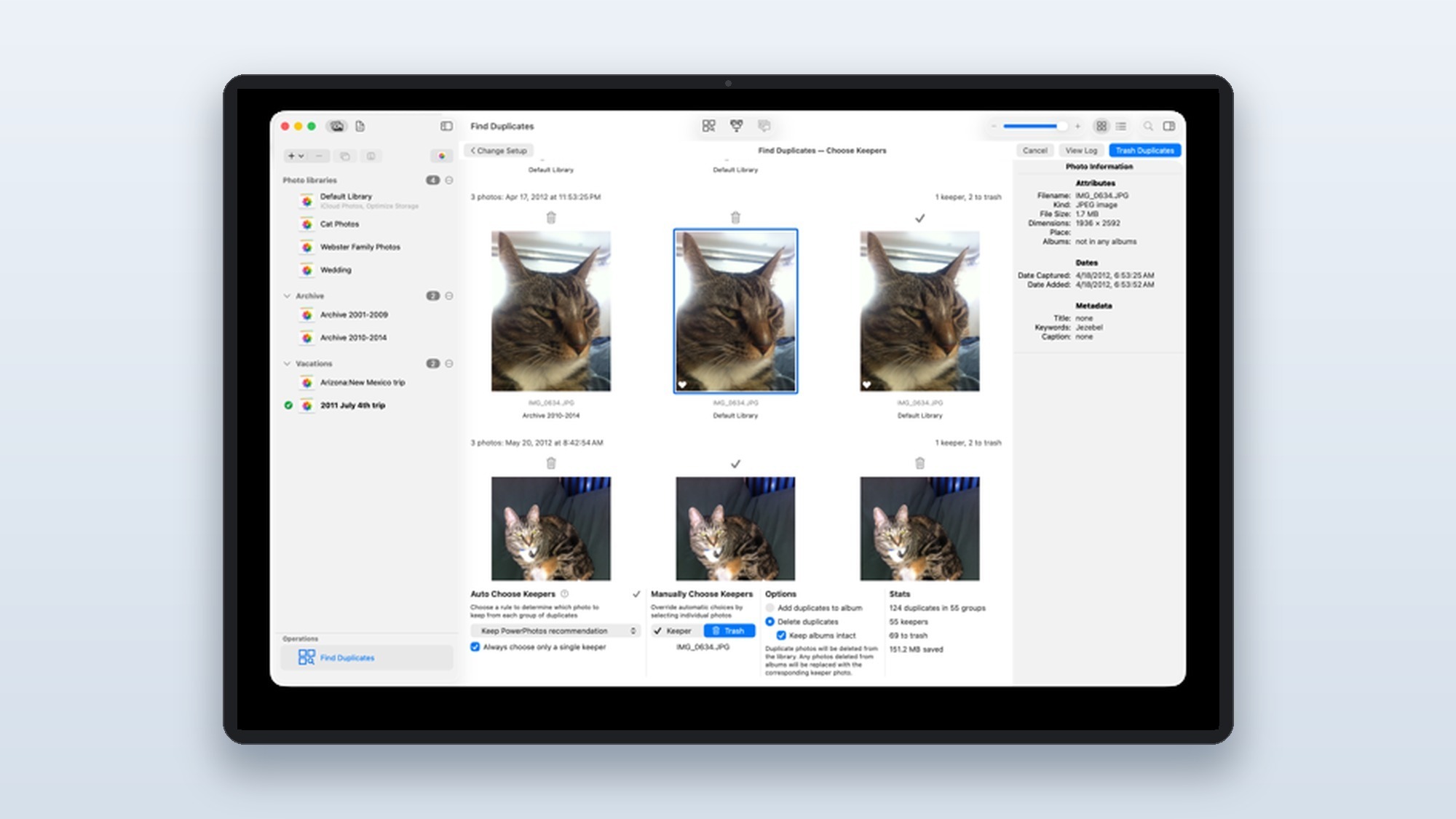
You have three solid options in 2026. The cheapest dedicated tool is Duplicate Annihilator for Photos by Brattoo Propaganda Software, which costs 7.95 dollars and offers a free trial that stops at 500 photos. It compares images by name, size, date, and resolution, the same approach the original iPhoto version used. For tougher jobs, PhotoSweeper detects visually similar shots, not just exact copies, and its Auto Mark feature is a big time saver, though the interface has a steeper learning curve. If you already own PowerPhotos, its built in duplicate finder lets you compare matches side by side before deleting.
Apple finally added a Duplicates album to Photos in macOS Ventura, which merges obvious exact copies for free. It is genuinely useful, but it is conservative by design. In practice it misses resized exports and near duplicates, which is exactly where a dedicated remover earns its keep.
Here is the safe sequence to follow, whichever tool you pick:
- Back up first. Copy your Photos library to an external drive before you delete anything. Duplicate removal is destructive, and a clean backup turns a scary operation into a reversible one.
- Scan the library. Run Duplicate Annihilator or PhotoSweeper to find both exact and near duplicate images across every album.
- Review the matches. Compare flagged pairs side by side, as in the PowerPhotos view below, and keep the highest resolution copy of each shot.
- Delete and reclaim. Remove the extras to free up local drive space and, just as importantly, the iCloud storage they were quietly eating.
Exporting to Flickr and Watermarking Without the Old Plugins
This is where the news is least cheerful. The classic iPhoto export to Flickr plugin options, FlickrExport, PictureSync, and FFXporter, are all dead, and they died for the same reason: Photos removed the export sheet and later stripped the Flickr and Facebook sharing extensions in macOS Mojave. There is no drop in replacement that lives inside Photos.
You now have two realistic paths to Flickr. Flickr Pro members can install the official Flickr Auto-Uploadr for Mac, which backs up an entire Photos library automatically. Everyone else exports the photos to a folder and uploads them through the Flickr website, with one catch worth noting: the web uploader does not accept HEIC files, so convert to JPEG on export first.
Watermarking follows the same story. Impression used to stamp a copyright mark during the iPhoto export step, but with the export sheet gone there is nothing to hook into. The modern approach is to export your selects, then run them through a standalone watermark app or a batch action before sharing. It is one extra step compared to the old plugin, but it gives you far more control over placement and opacity. The same export then process workflow suits creators who film on dedicated rigs like the DJI Pocket 4P and want a consistent mark across stills and video thumbnails.
Can Plugins Recover a Corrupted iPhoto Library?
Yes, and this is one area where a paid tool clearly beats the built in options. iPhoto Library Manager was famous for rebuilding corrupted libraries and pulling images out of damaged ones, and PowerPhotos carries that capability forward for the Photos app. According to Fat Cat Software, it can extract photos from a library that Photos itself refuses to open, which has saved more than a few people from data loss.
Before you pay for anything, try Apple’s own repair first. Hold Command and Option while launching Photos to bring up the Library Repair Tool, which fixes many database level problems for free. If that fails or the library will not open at all, a recovery focused app is your next step. Either way, do not keep working in a library you suspect is damaged, because every new edit can make the corruption worse.
Free iPhoto Add-ons in 2026: What Is Still Worth Installing
If you are hunting for free iPhoto add-ons 2026 style downloads, set your expectations carefully. Most of the genuinely free classics, GrowlPhoto, iPhoto Diet, the Shutterfly Export Assistant, are abandonware with no security updates and no chance of running on a modern Mac. Installing them is a risk with no payoff.
The free options actually worth your time are different. PowerPhotos offers a free 2.0 tier that handles library browsing and basic management before you ever pay. Duplicate Annihilator’s trial cleans up to 500 photos at no cost, which is plenty to test it on a sample. And Apple’s own Duplicates album and Library Repair Tool are free and built right into Photos. Surprisingly, the best free add-ons in 2026 are the features Apple folded into the operating system, not third party downloads.
What Users Actually Report
Dig through the MacRumors forums and Reddit threads in r/applehelp and r/mac, and a clear pattern emerges. Users consistently praise PowerPhotos for merging multiple libraries without losing albums or edits, calling it the tool that finally fixed the mess Apple left behind. Many owners report that it is the one purchase they wish they had made years earlier when juggling libraries across old and new Macs.
The complaints are just as telling. Long time iPhoto fans still mourn the loss of the export extensions and the Events view, and several users note frustration that there is no longer any way to push straight to Flickr from inside the app. On the cleanup side, the community view is that Duplicate Annihilator is reliable but its interface feels dated, while PhotoSweeper is more powerful but takes patience to learn. The consensus is that paying once for the right tool beats fighting the limits of free abandonware.
Are iPhoto Plugins Still Worth It in 2026?
So, are iPhoto plugins still useful after the Photos app migration? As literal iPhoto plugins, no. The app they extended is gone, the plugin system was removed, and 32-bit code stopped running years ago. Chasing the original downloads is a dead end that will cost you time and possibly your library’s integrity.
But the jobs those plugins did are as relevant as ever, and the modern replacements are genuinely better. If you do nothing else, two purchases cover almost everyone:
- Choose PowerPhotos if you manage multiple libraries, need to merge or split them, or have a corrupted library to rescue. It is the true successor to iPhoto Library Manager and the only library tool that runs on current Macs.
- Choose Duplicate Annihilator for Photos if your main problem is clutter. At 7.95 dollars with a free trial, it is the lowest risk way to reclaim space.
- Avoid any free classic plugin, GrowlPhoto, iPhoto Buddy, FlickrExport, and similar, because they will not install and offer nothing a modern Mac cannot do natively.
The best iPhoto plugins in 2026 are not plugins at all. They are focused, maintained Mac apps that respect the work you put into your photo library, which is exactly what the original tools tried to do before the platform moved on.
- Modern replacements like PowerPhotos are actively maintained and work with Apple Silicon
- Most paid tools use a one-time price between 7.95 and 39.95 dollars, not a subscription
- The right tool can merge, rebuild, and recover libraries that Apple Photos cannot fix on its own
- Free trials let you test duplicate removal before paying
- Almost every original iPhoto plugin is now abandoned and will not run on current macOS
- Apple removed the plug-in and sharing extension system, so nothing installs inside Photos the way it did in iPhoto
- Truly free add-ons in 2026 are mostly abandonware with no security updates
Frequently Asked Questions
How much do paid iPhoto plugins typically cost in 2026?
Most one-time licenses sit between 7.95 and 39.95 dollars. Duplicate Annihilator for Photos is 7.95 dollars, while PowerPhotos, the spiritual successor to iPhoto Library Manager, is 39.95 dollars. None of these mainstream tools use a monthly subscription, which is rare for Mac software today.
Will old iPhoto plugins run on Apple Silicon Macs?
In almost all cases, no. Most original iPhoto plugins were 32-bit and stopped working when macOS Catalina dropped 32-bit support in 2019. Apple Silicon Macs cannot run them at all, so you need a current 64-bit app built for the Photos app instead.
Is iPhoto Library Manager still available to download?
Fat Cat Software has retired iPhoto Library Manager and now points users to PowerPhotos, which does the same library merging, splitting, and repair work for the modern Photos app. Old copies of iPhoto Library Manager will not open a current Photos library.
Can I still open my old iPhoto library on a new Mac?
Yes. The Photos app can migrate an old iPhoto library on first launch, importing your images and edits. Be aware that books, cards, and slideshows convert to plain albums, and their original text and layout are lost during the migration.
Does Apple Photos have a built-in duplicate finder now?
Yes. Since macOS Ventura in 2022, Photos includes a Duplicates album that merges exact copies for you. It is convenient but conservative, so a dedicated remover like Duplicate Annihilator or PhotoSweeper still catches near duplicates and resized copies that Apple ignores.
Is PhotoSweeper better than Duplicate Annihilator?
PhotoSweeper is more flexible because it detects visually similar shots, not just exact matches, and its Auto Mark feature speeds up large cleanups. The trade off is a steeper learning curve. Duplicate Annihilator is simpler and cheaper, which makes it the easier pick for a one time cleanup.