You may already convert your video to DVD file with some converters, the DVD file look like Video_TS folder and Audio_TS folder, and this step by step guide is regarding how to burn the TS folder to DVD disc to play on DVD player and TV for free.
If you want to know how to rip and copy DVD movie to computer, you can follow this step by step guide: How to rip and copy DVD to computer?
If you want to copy DVD to another DVD to make copies of DVD, this step by step tutorial would help you a lot: How to copy DVD to another blank DVD?
The program you need in this tutorial is CDBurnerXP, it’s a nice CD/DVD burning software, free without watermark and any limitation, compatible with all windows systems. You can download it free from here directly. We have scanned it with Norton virus protector, it’s safe and clean. Now, let’s start the guide to burn Video_TS folder and DVD files to DVD.</p
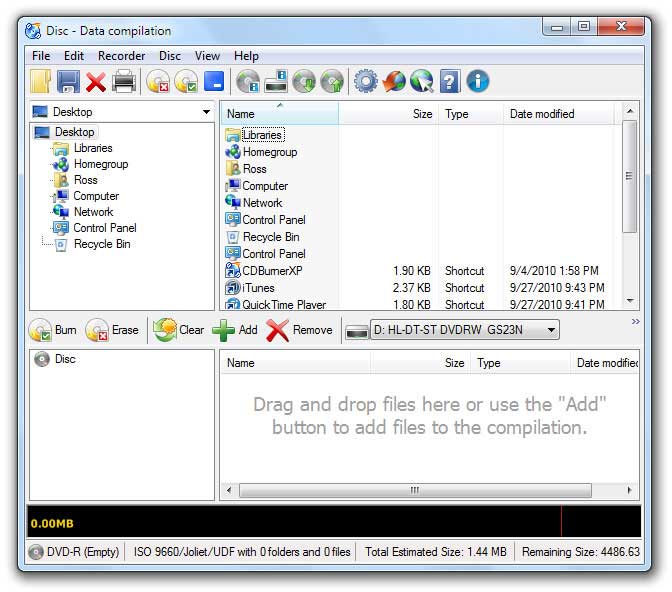
Step 1. Download and install CDBurnerXP. The installation is very simple, just click “Next”. Run CDBurnerXP after the installation has completed. Put a blank DVD disk into your DVD burner, for example, DVD-R or DVD+R disc. Select the Data disc option from the main CDBurnerXP interface and then click OK.

It will pop up the Data disc panel as follow.
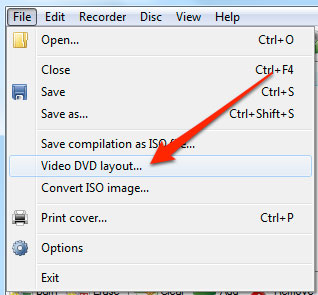
Step 2. Select File from the main menu, and then Video DVD Layout… from the drop-down list. And then located to your VIDEO_TS folder, select it and click the Create movie image button.
Step 3: After the TS folder loaded into CDburnerXP. Click the Burn button to start the burning process.

Step 4: In the pop up Burn Disc windows, Select Finalise disc from the list of options.

Step 5: The burning process should be start automatically, for a regular two hours long movie, it takes about 15 minutes to finished the task with the 8 X burning speed.

Once completed, you can close CDBurnerXP and eject the DVD disk, and then you can enjoy the movie on your TV, that’s all, it couldn’t be easier.
{
“@context”: “https://schema.org/”,
“@type”: “HowTo”,
“name”: “How to burn video to DVD”,
“description”: “This step by step guide is regarding how to burn the TS folder to DVD disc to play on DVD player and TV for free.”,
“image”: “https://www.reviewstown.com/wp-content/uploads/2017/03/burn-videots-to-dvd-1200×720.jpg”,
“totalTime”: “PT30M”,
“estimatedCost”: {
“@type”: “MonetaryAmount”,
“currency”: “USD”,
“value”: “0”
},
“tool”: {
“@type”: “HowToTool”,
“name”: “CDBurnerXP”
},
“step”: [{
“@type”: “HowToStep”,
“text”: “Run CDBurnerXP after the installation has completed. Put a blank DVD disk into your DVD burner. Select the Data disc option from the main CDBurnerXP interface and then click OK.”,
“image”: “https://www.reviewstown.com/img/tutorial/cdburnerxp.jpg”,
“name”: “Install and Run CDBurnerXP”,
“url”: “https://www.reviewstown.com/guide/how-to-burn-video-ts-folder-and-dvd-files-to-dvd/#step1”
},{
“@type”: “HowToStep”,
“text”: “Select File from the main menu, and then Video DVD Layout… from the drop-down list. And then located to your VIDEO_TS folder, select it and click the Create movie image button.”,
“image”: “https://www.reviewstown.com/img/tutorial/add-converted-dvd-files.jpg”,
“name”: “Located Video_TS file and Add into CDburnerXP”,
“url”: “https://www.reviewstown.com/guide/how-to-burn-video-ts-folder-and-dvd-files-to-dvd/#step2”
},{
“@type”: “HowToStep”,
“text”: “After the TS folder loaded into CDburnerXP. Click the Burn button to start the burning process.”,
“image”: “https://www.reviewstown.com/img/tutorial/burn-ts-folder-to-dvd.jpg”,
“name”: “Click Burn start the burning process”,
“url”: “https://www.reviewstown.com/guide/how-to-burn-video-ts-folder-and-dvd-files-to-dvd/#step3”
},{
“@type”: “HowToStep”,
“text”: “In the pop up Burn Disc windows, Select Finalise disc from the list of options.”,
“image”: “https://www.reviewstown.com/img/tutorial/finalise-disc.jpg”,
“name”: “Finalise DVD Disc”,
“url”: “https://www.reviewstown.com/guide/how-to-burn-video-ts-folder-and-dvd-files-to-dvd/#step4”
},{
“@type”: “HowToStep”,
“text”: “The burning process should be start automatically, for a regular two hours long movie, it takes about 15 minutes to finished the task with the 8 X burning speed.”,
“image”: “https://www.reviewstown.com/img/tutorial/burn-dvd-files-to-dvd.jpg”,
“name”: “Burn video to DVD”,
“url”: “https://www.reviewstown.com/guide/how-to-burn-video-ts-folder-and-dvd-files-to-dvd/#step5”
}]
}