

The OnePlus Ace 7 makes the most sense when your phone doubles as your main gaming device. Its appeal is the combination of a fast display, active cooling and a large battery, rather than one benchmark score. The buying decision starts with the games you actually play: a supported competitive shooter can use its high frame-rate modes, while a title capped at 60fps asks much less of the screen.
There is also a useful reason to consider the standard model before the Ace 7 Pro. Both have the headline battery and cooling features. The extra spend needs to buy something you will use, such as the Pro’s telephoto camera or larger storage option, rather than simply a more expensive badge.
What 185Hz means for your games
OnePlus lists a 6.78-inch flat display with adaptive refresh up to 165Hz in everyday use and up to 185Hz in selected games. That last qualification matters. The panel can only show the frames available to it; a game’s supported modes, graphics settings and software version still determine what you can select. OnePlus specifications.
Illustrative landscape gaming scene. Product reference: MyDrivers.
Here is what the refresh-rate differences mean mathematically:
| Refresh rate | Time between display refreshes | Difference from 120Hz |
|---|---|---|
| 120Hz | 8.33ms | Baseline |
| 165Hz | 6.06ms | 2.27ms shorter |
| 185Hz | 5.41ms | 2.93ms shorter |
These are calculated refresh intervals, using 1,000 divided by Hz, not measured input latency. Moving from 165Hz to 185Hz shortens the interval by about 0.66ms. Touch processing, game rendering and network delay remain separate parts of the response you experience.
For a buyer coming from 120Hz, both higher modes are relevant. For someone already using a good 165Hz phone, the extra 20Hz alone is a thin reason to upgrade. A steadier frame rate during a long match would be the more useful improvement, provided the game supports it.
MyDrivers’ Ace 7 testing reported the following selected results:
| Game and selected mode | Average frame rate | Reported average power |
|---|---|---|
| Peacekeeper Elite, Smooth graphics, 185fps | 184.19fps | 4.68W |
| Delta Force, HD graphics, 185fps | 184.46fps | 6.90W |
| Genshin Impact, highest graphics, 60fps | 60.26fps | 4.69W |
The first two sessions ran for roughly half an hour; the Genshin run was about 30 minutes. These are different workloads, not an efficiency ranking between games. Peacekeeper Elite is the Chinese title tested, so its result does not establish the same mode or performance in PUBG Mobile elsewhere.
Choose around your actual game settings. If your favourite title remains at 60fps, prioritize sustained performance, controls and battery behaviour over the 185Hz headline. If you regularly play supported high-frame-rate shooters, the display becomes a stronger part of the purchase case.
The cooling fan has a useful job, with specific limits
The Ace 7 uses separate airflow routes aimed at chip cooling and the area held by the player. This is a more useful design distinction than treating every temperature number as the temperature of the entire phone. OnePlus’s published claim of up to 10°C lower temperature compares the same phone with its fastest fan mode enabled versus its fan off. The measurement concerns the rear near the chip after one hour of Peacekeeper Elite at Smooth graphics and 185fps, in 25°C ambient conditions. OnePlus product notes.
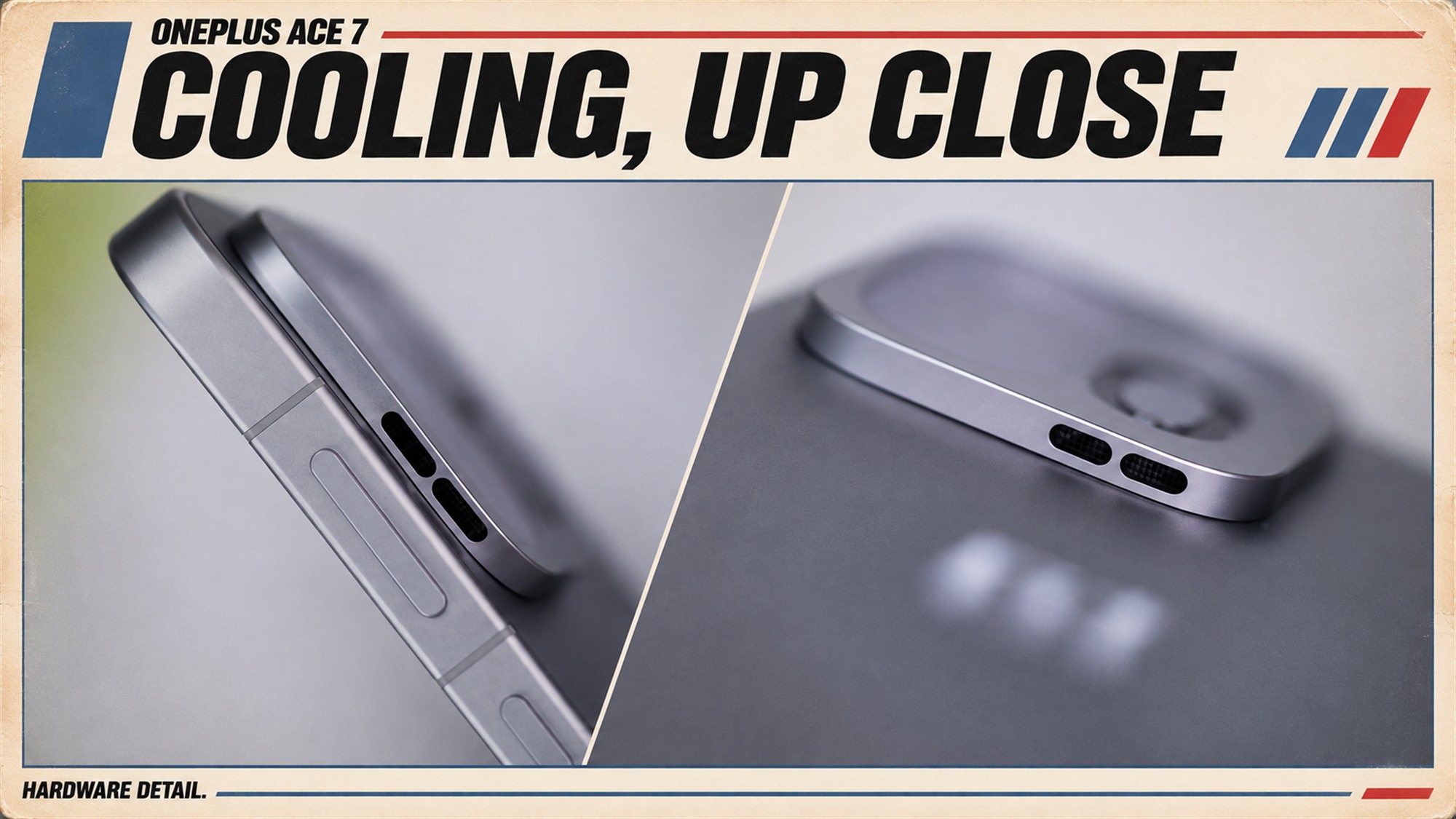
Cooling detail composite based on MyDrivers product photographs.
MyDrivers separately recorded rear hotspots of 53.7°C with the fan off and 43.9°C with it on during AnTuTu runs. That 9.8°C difference is a benchmark comparison, not a promise for every game. The publication also credits cooler seasonal conditions for its gaming temperatures.
The sensible inference is that active airflow can be useful under sustained load. It does not establish that the Ace 7 will reproduce those temperatures outdoors, with a different case, or in a warmer room. Nor does the temperature difference tell you how much faster it is than another phone.
Fan noise deserves its own consideration. GeekRadar’s analysis identifies acoustics, case use and ambient temperature as unresolved practical questions. The sources here do not supply a comparable decibel test. If you play beside someone in a quiet room, a lower case temperature alone does not answer whether the fan setting will suit that space.
Before paying extra for active cooling, ask whether heat currently interrupts your sessions. If your problem is a warm handset or falling performance after extended play, this feature addresses a relevant need. If you mainly play short, casual sessions, it may contribute less to your daily experience than the battery or camera arrangement.
Battery life and charging: look at the tested range
MyDrivers’ Battery Dog run lasted 13 hours, 54 minutes and 24 seconds from 100% down to 20%. Its roughly 17.4-hour full-range figure is a linear extrapolation, not a completed discharge test. In charging, the supplied adapter took about 56 minutes from 20% to full, reaching 65% after 30 minutes.
Those results answer two separate questions: how long a particular workload ran, and how quickly a partially depleted phone recovered. They do not establish 14 hours of high-frame-rate gaming, or a 56-minute charge from empty. For your own routine, the useful comparison is the starting percentage and the time you normally have near a socket.
There is a second, less obvious buying issue: the charger already on your desk. The official charging specifications distinguish up to 100W SUPERVOOC, up to 55W PPS and 18W USB PD. A laptop adapter advertising 100W therefore does not automatically give this phone 100W. The shared charging protocol matters as well as the number on the adapter.
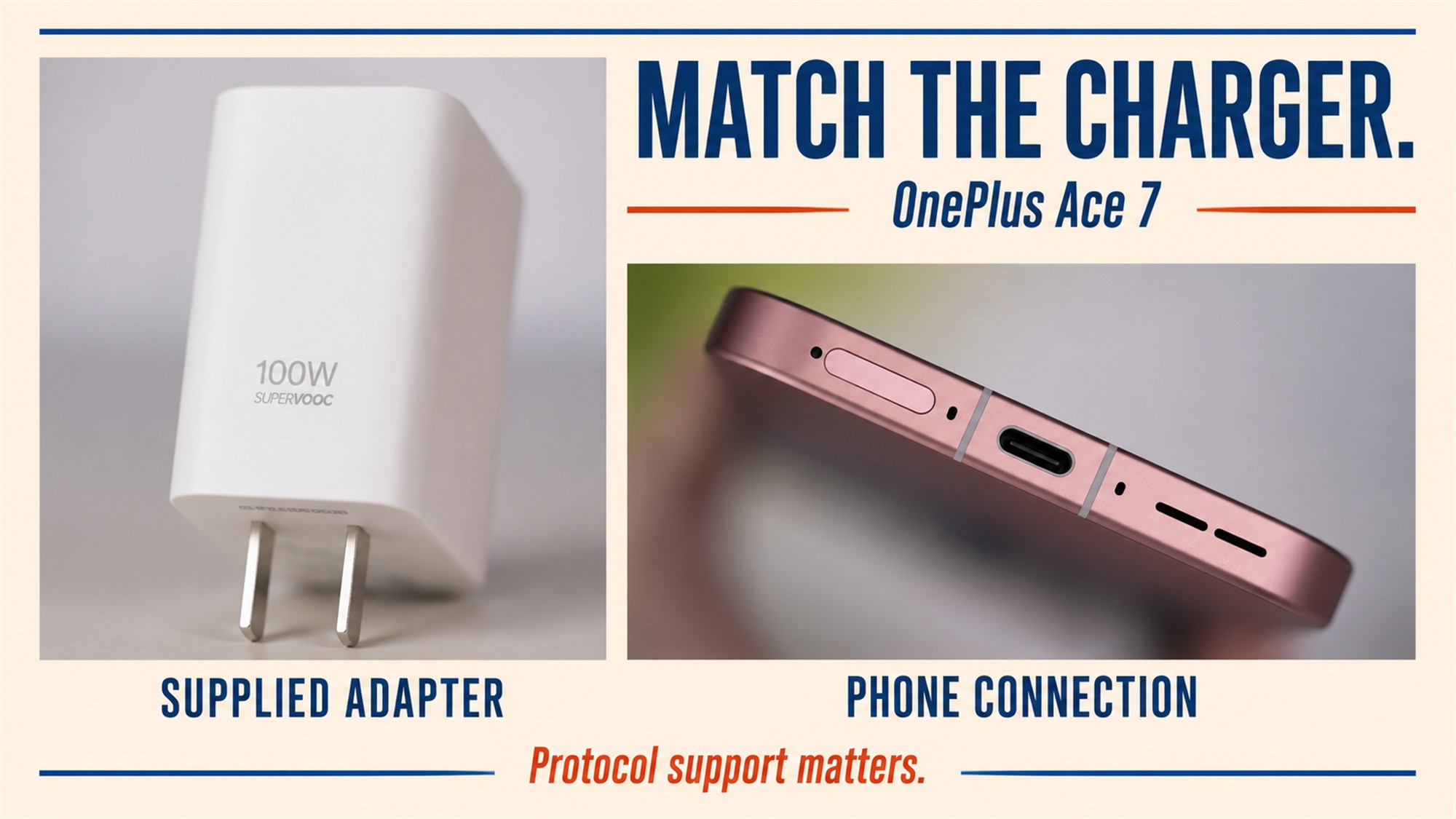
Supplied adapter and phone connection composite, with product references from MyDrivers.
This creates two different ownership scenarios. If you keep the supplied charger at your usual gaming spot, the tested charging setup is relevant. If you travel with one USB-C laptop charger, check its PPS output profiles and the phone’s compatibility before assuming the same charging time. Connector compatibility is not a speed guarantee.
For plugged-in play, OnePlus also provides bypass power through the game assistant. It is intended to feed the board directly while reducing battery-charging heat. Treat that as a feature to enable when appropriate, not a measured guarantee of zero heat or a specific extension of battery lifespan.
Ace 7 or Ace 7 Pro: pay for the difference you need
The comparison is more useful when it separates shared features from actual reasons to upgrade. These are the current China-model configurations in the Ace 7 and Ace 7 Pro specifications, with cooling details on the Pro product page.
| Buying consideration | Ace 7 | Ace 7 Pro |
|---|---|---|
| Processor | Snapdragon 8 Elite Gen 5 V Series | Snapdragon 8 Elite Gen 5 |
| Typical battery capacity | 9,000mAh | 9,000mAh |
| Maximum SUPERVOOC charging | 100W | 100W |
| Active cooling | Dual airflow system | Dual airflow system |
| Rear cameras | 200MP main and 8MP ultrawide | 200MP main and 50MP telephoto, 3.5x optical zoom |
| Largest listed storage tier | 512GB | 1TB |
The Pro is not automatically the better camera choice for every shot. Its telephoto is useful for a buyer who wants more reach, but its listed two-camera arrangement does not include the standard model’s ultrawide. Decide whether you more often want to fit a wider scene into the frame or bring a distant subject closer. Megapixels alone cannot settle that choice.
The standard model already includes the cooling system and battery capacity central to this article. If those are your priorities, start there. Move to the Pro when its camera arrangement or storage ceiling addresses a real constraint. The processor names differ, but these sources do not provide a matched Ace 7 versus Pro test from which to assign a reliable performance percentage.
When comparing offers, match RAM and storage first, then compare the actual final price and support terms. A discounted entry configuration and a larger-memory Pro are not a clean measure of the upgrade premium.
Is the Ace 7 a good fit for everyday use?
Its gaming focus comes with ordinary ownership tradeoffs. OnePlus specifies approximately 217g for the black and white versions, and 223g for the gradient glass version. The data port is USB 2.0. Those details matter if you want a light phone or regularly copy large video files by cable; neither is improved by a faster gaming display.
Choose the Ace 7 if supported high-frame-rate games are a regular part of your week, you want the standard model’s ultrawide camera, and the listed storage options cover your library. Choose the Ace 7 Pro if optical reach or a 1TB option is worth the price difference to you. Look beyond both if low weight or fast wired data transfer is a leading requirement.
For another battery-focused gaming-phone decision, our REDMI K100 guide provides a useful next comparison. Compare equivalent games, settings and charging ranges rather than treating two battery capacities or unrelated benchmark scores as a direct contest.
- Active cooling and a large battery are available on the standard model
- Supported games can use display refresh rates up to 185Hz
- An ultrawide camera offers a different shooting option from the Pro
- The highest refresh rate applies only to selected games
- A generic 100W USB-C charger does not guarantee 100W phone charging
- USB 2.0 data transfer and approximately 217g or 223g weight remain everyday tradeoffs