

Two choices in Machenike’s store look like upgrades, but they solve different problems. The Core Ultra 7 256V model comes with a choice of 1TB or 2TB of storage. Both have 16GB of memory. The Core Ultra X7 358H model lists the same two SSD capacities with 32GB of memory. Choose the larger drive if you need to keep more footage on the road. If your editing software runs out of memory, the 2TB 256V leaves you at the same limit as the 1TB unit in MyDrivers’ tests.
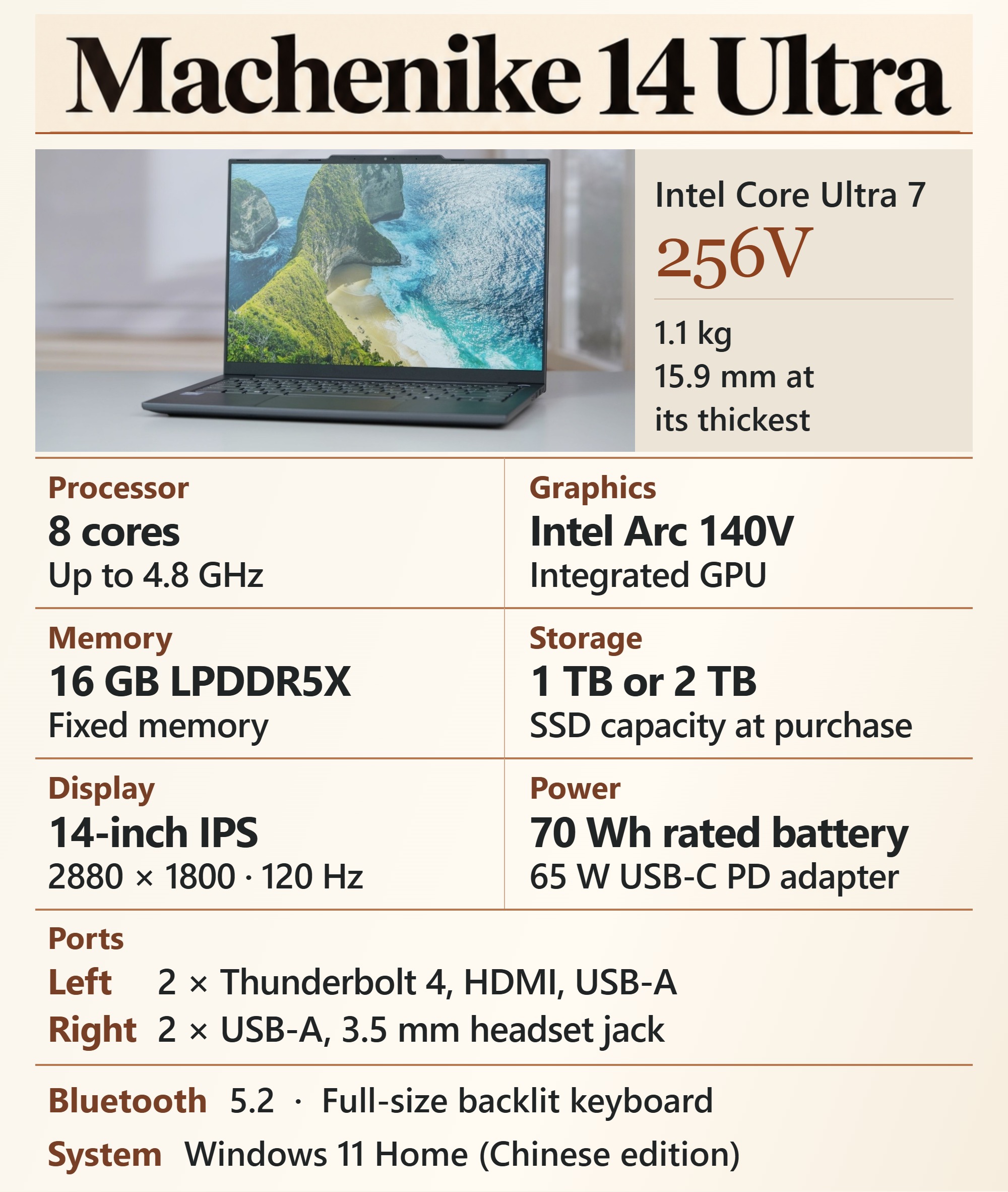
Machenike lists the same 16GB of memory with either SSD capacity. Port positions are shown from the seated user’s perspective. Photo: MyDrivers.
Start with the memory decision
The last digit of Intel’s processor number matters more here than a small difference in a benchmark. In Intel’s Series 2 product brief, the Core Ultra 7 256V and 258V both have eight cores and a maximum clock of 4.8GHz. The 256V has 16GB of memory on the processor package. The 258V has 32GB. You cannot turn the former into the latter by fitting a memory module.
MyDrivers’ CPU comparison found the 256V close to a 258V at the same 28W power level in CPU tests including Cinebench R23. If you write, browse and edit one project at a time, paying more solely for the expectation of a much faster processor is hard to justify from those results. The comparison changes when your applications need more memory than the machine can provide.
Try this before choosing: on your current Windows laptop, open the project you travel with, join a call, then bring up the browser tabs and applications you normally leave open. Check the Memory pane in Task Manager while switching between them. If available memory stays low on a 16GB system and switching between apps slows it down, a quick Cinebench run should carry less weight than the extra capacity of a 32GB alternative.
For video editors there is a clearer dividing line. Adobe’s Windows recommendations for Premiere 26.x specify 16GB of RAM for HD footage and at least 32GB for 4K. The Machenike meets the HD memory recommendation. If your regular job is cutting 4K footage, buy the extra memory up front.
For Android developers, the choice depends on where the app runs during testing. Google’s Windows requirements put Android Studio alone at an 8GB memory minimum. Running Studio with the emulator raises that minimum to 16GB, and Google recommends 32GB. If you usually test on a physical phone, you can leave the emulator closed. If you keep several virtual devices open to compare screen sizes or Android versions, the 32GB configuration is the better fit.
How far can the Arc 140V take a game?
MyDrivers recorded a Time Spy graphics score of 3,587 for the integrated Arc 140V. A separate test of the 16GB Machenike on SMZDM gives that number a practical reference: its reviewer measured an average of 75 fps in Shadow of the Tomb Raider at 1080p on the low preset. The 14 Ultra’s native 2880 by 1800 setting draws 2.5 times as many pixels as 1920 by 1080. Turning up the resolution and counting on the same frame rate would be a poor bet.
An HP OmniBook owner on Reddit ran into precisely this comparison problem when their 256V laptop fell short of footage from an Arc 140V handheld. For a game you actually play, look for the same resolution and preset, then check the power mode and whether upscaling or frame generation was enabled. Here, 1080p low is a useful starting point. A shopper who specifically wants 120 fps at the panel’s native resolution still needs a benchmark for that game and setting.
What 1.1kg buys on a working trip
MyDrivers’ hardware photos show a metal laptop weighing 1.1kg on its own and measuring 15.9mm at its thickest point. The port layout makes that weight more useful. HDMI, a USB-A port and both Thunderbolt 4 connectors are on the left. Two more USB-A ports and the headset jack sit on the right. You can connect a presentation screen, a receiver and wired headphones without making a dock part of your packing list.
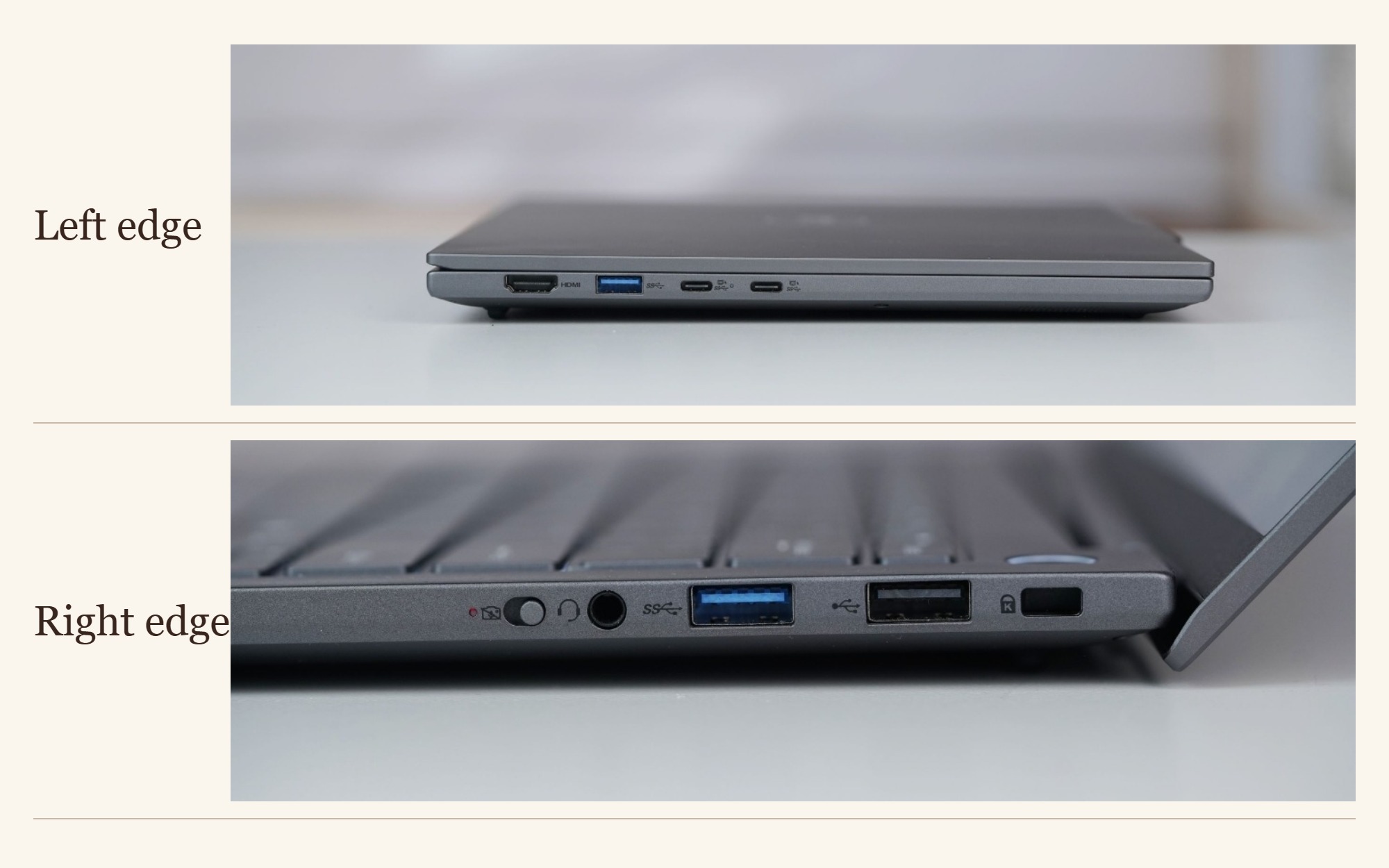
Both Thunderbolt ports sit on the left. The right edge has two USB-A ports and the headset jack. Product photography (cover and ports): MyDrivers.
Both Thunderbolt ports being on the same edge is the detail to remember at a fixed desk. Picture where the display cable and charging lead will run if the power outlet is on your right. The three rectangular USB ports also do different jobs: MyDrivers identifies one on the right as USB 2.0. Put a mouse receiver there and leave a faster port free for a portable drive.
The 256V teardown on SMZDM puts the supplied 65W power adapter at 130g. Added to the 1.1kg notebook, that is about 1.23kg before a sleeve or other accessories. The Xiaomi Book Pro 14 is another portable option to put on that shortlist.
Can your desk monitor replace the dock?
For a conference room with an HDMI screen, the 256V hardware report lists 4K output at 60Hz over HDMI. Keep the USB-C charger handy for a long presentation. At a permanent desk, the same report lists DisplayPort 1.4 video output over Thunderbolt 4. A monitor whose laptop-facing USB-C port accepts video and supplies 65W over USB Power Delivery can carry the picture and power the notebook through one compatible cable. Check those two features on the monitor you own before buying a dock. A USB-C socket used only for charging will not carry the picture.
For calls in either setting, there is a small control worth knowing about. ZOL’s photos of the 256V place the electronic camera privacy switch on the right edge beside the ports. If the built-in camera disappears just before a meeting, check that switch first.
How long does the 70Wh battery last in office work?
Three reviewers ran PCMark 10 Modern Office on the 256V. Pick the setup that looks most like your working day.
| Test and runtime | Reported settings |
|---|---|
| ZOL 9h 59m |
75% brightness, Balanced in Machenike Control Center. |
| MyDrivers 13h 25m |
50% brightness, energy-saving mode, other processes closed. Refresh rate unspecified. |
| SMZDM 23h 58m |
50% brightness, long-battery mode, 60Hz display, keyboard backlight off. |
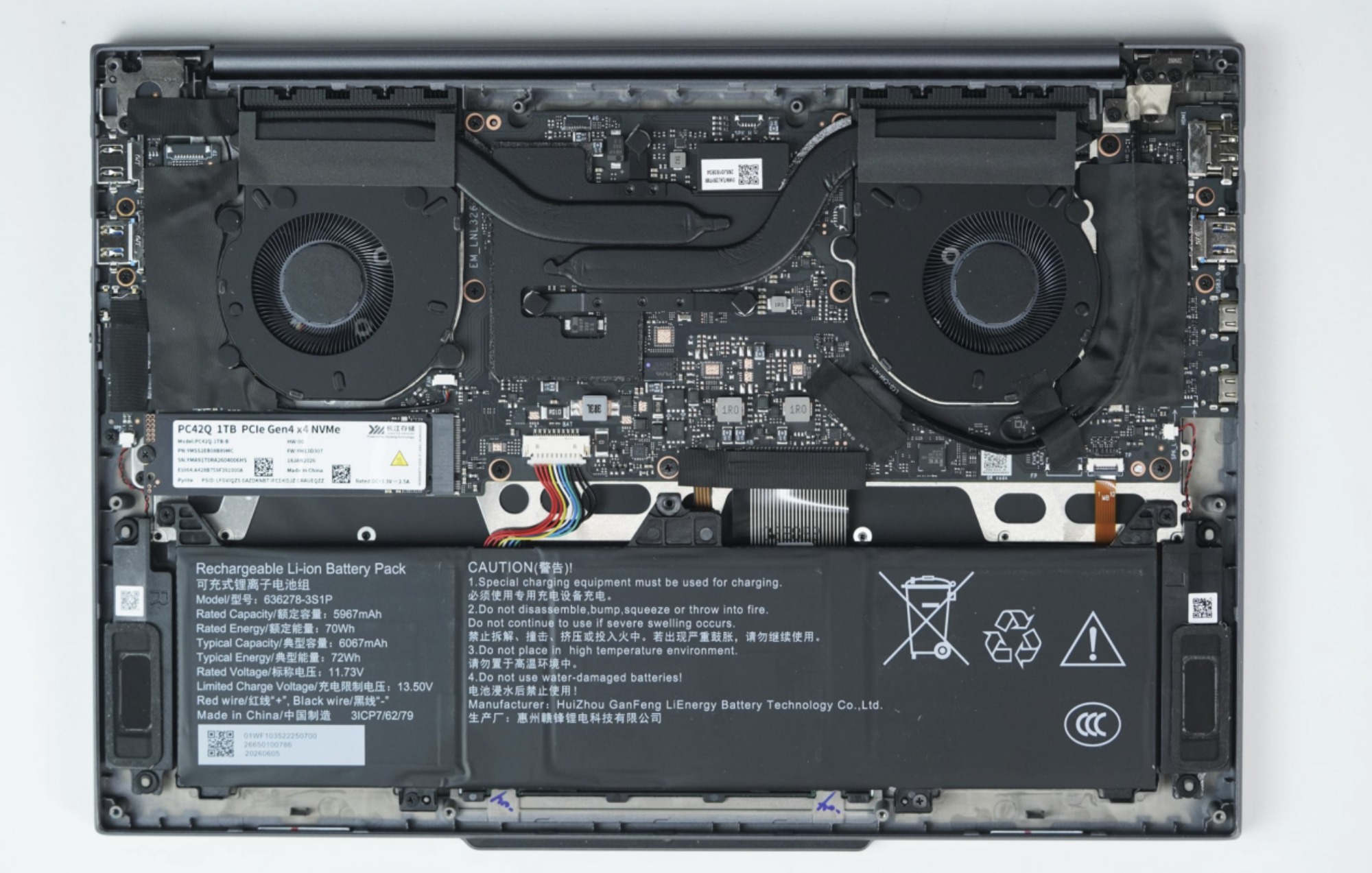
The battery occupies most of the lower half of the chassis. Its label distinguishes rated from typical energy. Photo: MyDrivers.
If you usually turn the screen up in a bright room, ZOL’s run is the closest of the three on brightness. For writing on a train, the 60Hz run gives you settings to try. The tests changed multiple variables, so the gap cannot tell you how much time lowering the refresh rate alone would save. A calendar full of video calls is a different workload from any of these office runs.
Power limits matter on mains, too. In MyDrivers’ AIDA64 FPU stress test, the CPU started at 36W and settled near 28W, with a reported CPU temperature of 80°C. For a long export, that sustained figure tells you more about the cooling system than the opening burst. It still cannot tell you how long your particular Premiere project will take.
The display decision depends on what you deliver
The 14-inch IPS screen pairs a 2880 by 1800 resolution with a 120Hz refresh rate. For a spreadsheet or a long document, the taller 16:10 shape is the part you can use all day. For a photo editor, the more revealing numbers are in MyDrivers’ panel measurements: 95% sRGB coverage and 75% P3 on its sample, with an average Delta E of 0.84. The maximum error was 4.79, so the average also hides the least accurate patch.
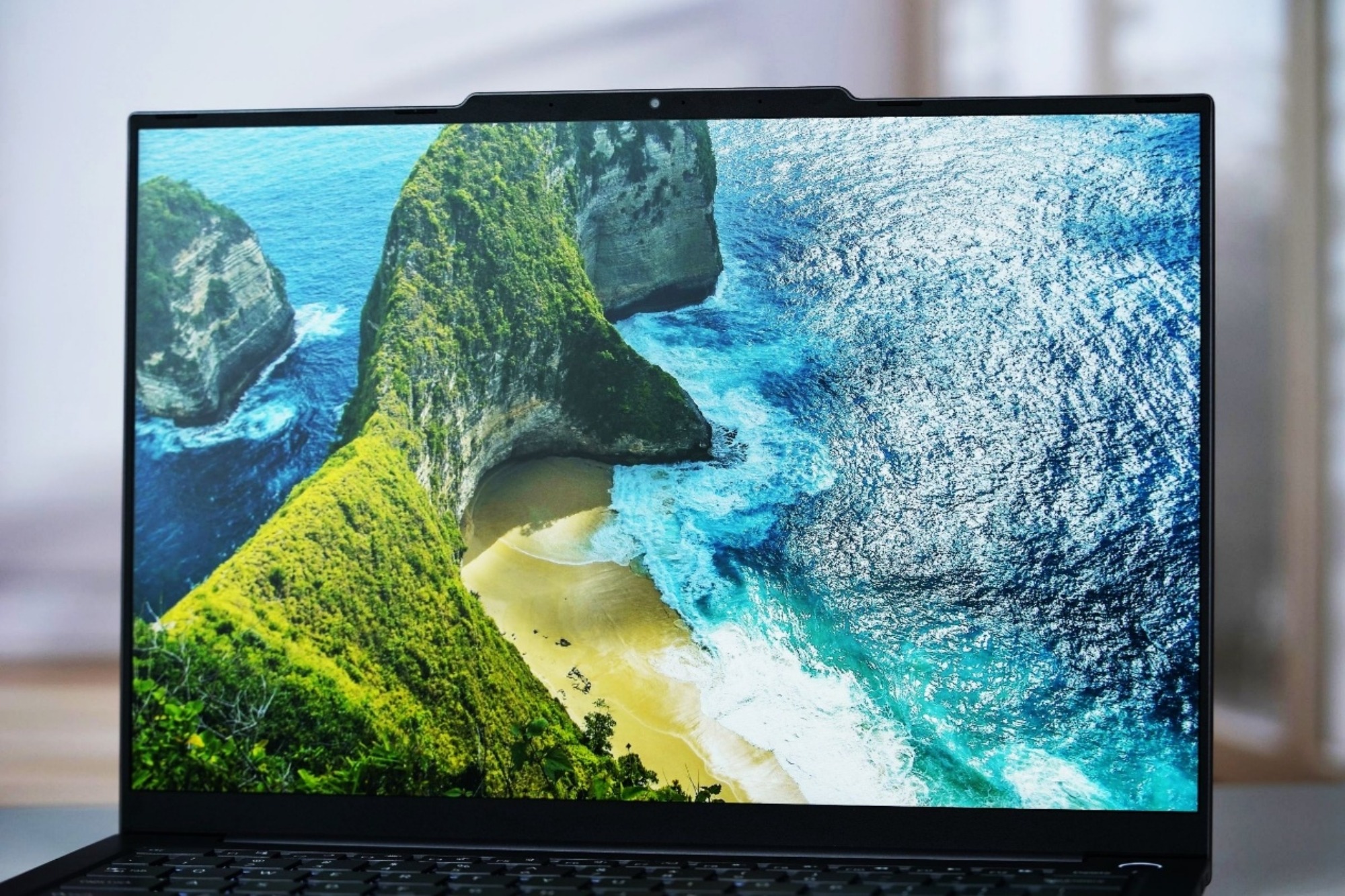
The 14-inch panel and its bezel. Color coverage is reported from the instrument readings. Photo: MyDrivers.
In its 256V review, ZOL measured 99% sRGB and 77% P3. Both tests put the display much closer to full sRGB coverage than full P3. Accuracy and gamut answer different questions. A low average error describes how closely the panel reproduced the tested patches. It cannot extend the range of colors the panel can show. For web graphics delivered in sRGB, the measured coverage gives you a starting point for judging the built-in display. If final approval involves saturated P3 colors, budget for a suitable external monitor or choose a laptop with measured coverage closer to your delivery space.
The SSD is fast, but which speed matters?
MyDrivers found a bare 1TB YMTC PC42Q SSD in its unit. In its storage tests, CrystalDiskMark reported a sequential read speed of 7,070MB/s. The PCMark 10 Full System Drive test reported 441MB/s of bandwidth. The numbers differ because they measure different work. The first describes moving data in sequence; UL’s Full System Drive benchmark replays traces from applications and common tasks. A large archive, a folder of tiny files and the startup of an application will not all behave like a sequential read.
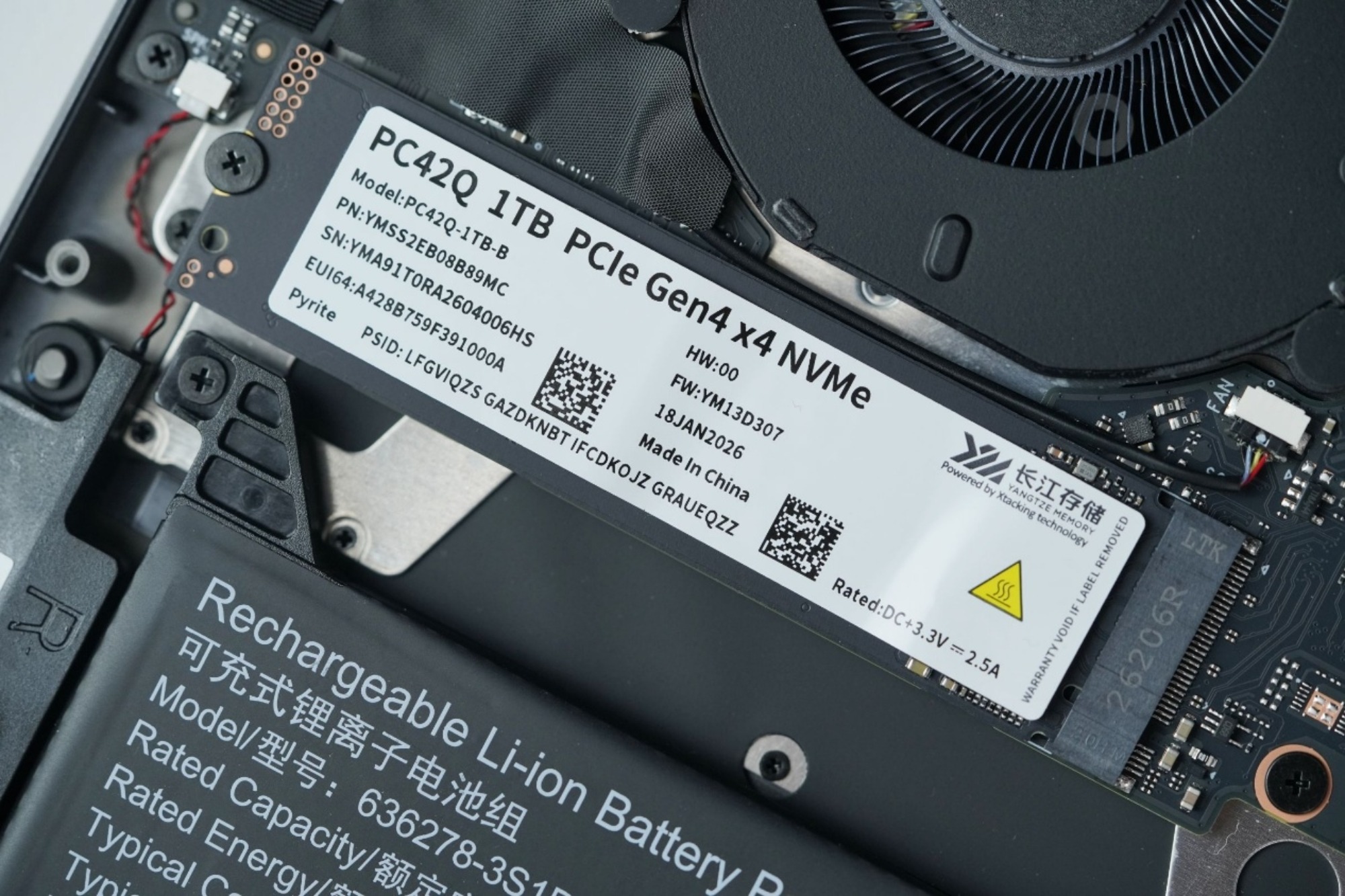
The PC42Q label identifies the drive in the review unit. The SSD has no separate heatsink. Photo: MyDrivers.
The same distinction matters for heat and service life. Under the reviewer’s storage load, the controller reached 80°C and the NAND reached 59°C, with no throttling reported in that test. The drive’s health reading after 16.7TB of writes was a snapshot of one unit. Extrapolating it into years of trouble-free operation would give it more predictive value than it has. For anyone buying this laptop as a portable editing machine, a backup plan is more valuable than a projected failure date.
Check the Windows edition before buying for work
Machenike’s 256V specifications list Windows 11 Home in Chinese. If you need English menus, ask for the exact edition shown under Settings > System > About and confirmation that English is available as a display language on the unit being sold. Microsoft distinguishes Home Single Language from editions that allow extra display languages. A photo of an English keyboard tells you nothing about the language available in File Explorer.
For a company-managed laptop, ask IT whether the device itself must join Microsoft Entra ID. Microsoft excludes Windows Home from Entra join. If joining is mandatory, include the cost of an eligible Windows edition in your comparison, or order a laptop your IT team already supports.
For someone who already works comfortably in 16GB and carries a notebook every day, the 256V earns a place on the shortlist. If your normal job involves 4K editing or signing off wide-gamut color away from a desk, choose for that requirement first.
Frequently Asked Questions
Can I add a second SSD and keep the original 1TB drive?
The published teardowns disagree. MyDrivers describes two drive bays, while the SMZDM reviewer identifies a single M.2 slot on the 256V. Before ordering a bare drive, ask the seller for a board photo or service document showing a free socket on your exact configuration. An external SSD lets you keep the original drive either way.
Will a 100W USB-C charger top up the 14 Ultra faster?
In the SMZDM charging test, the battery went from 8% to 42% in 34 minutes. The tester measured about 37W, and switching to a 100W PD adapter did not increase that reading. If your only reason to replace the supplied 65W charger is a faster top-up during lunch, that test gives little reason to spend the money.
Why does the battery stop charging at 80% when plugged in?
Check the battery protection setting in Machenike Control Center. The 256V tester found a Health mode that stopped at 80% for desk use. Normal mode allowed a full charge. If you want the extra capacity for a trip, check that setting before leaving the laptop on charge overnight.