30-Second Verdict
The Xiaomi Book Pro 14 (2026) is a direct challenge to the premium ultraportable category. It pairs a 3.1K OLED panel with a sub-1.1kg magnesium-lithium chassis and a dedicated IoT module that keeps your smart home connected even when the lid is shut.
The target buyer is clear: a Xiaomi ecosystem user who wants MacBook Air portability without sacrificing display quality or port selection.
Design and Build: Magnesium Alloy Mastery
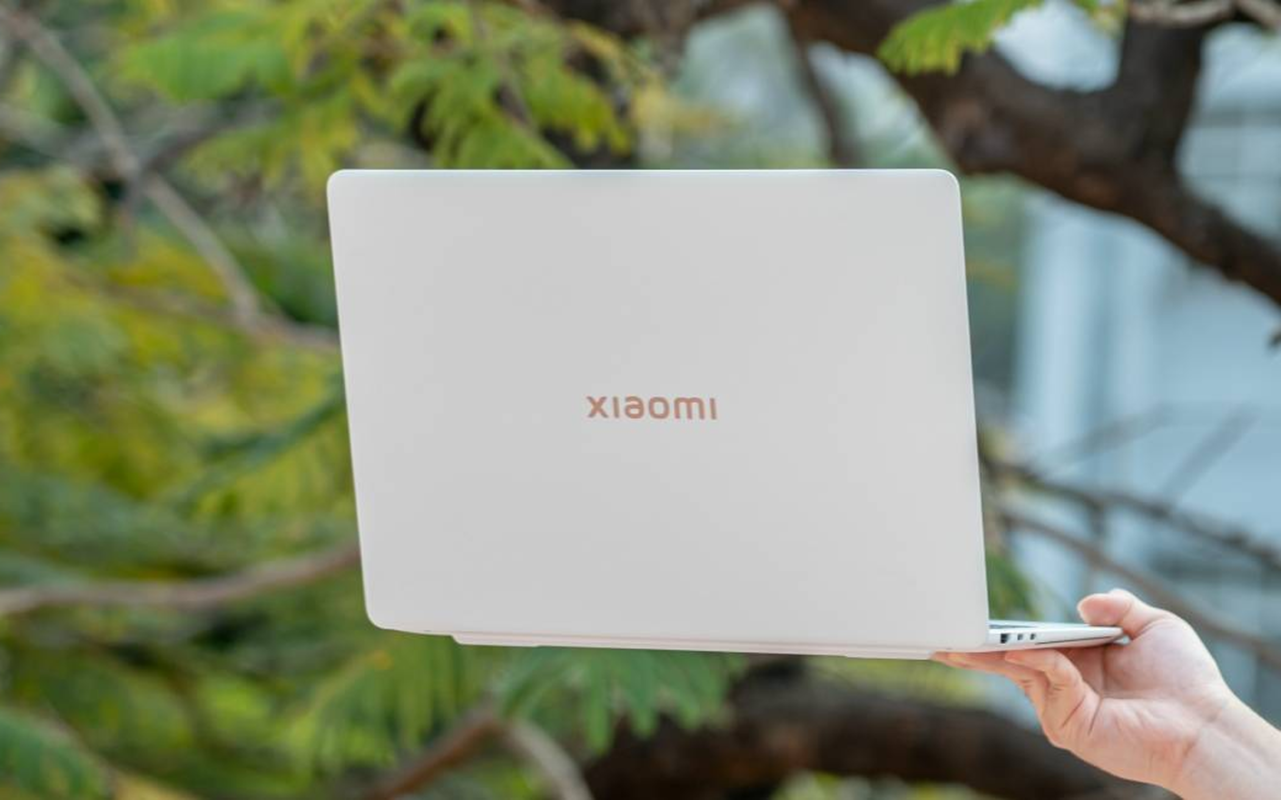
The Xiaomi Book Pro 14 uses a magnesium-lithium alloy frame, a material Xiaomi describes as a “soft” metal. According to official product documentation, the finished weight sits at 1.08kg.
That number is significant. The MacBook Air M3 (13-inch) weighs 1.24kg, and the Dell XPS 13 Plus comes in at 1.23kg. Xiaomi’s chassis is measurably lighter than both direct competitors.
The wedge profile tapers toward the front edge, a shape that makes the machine feel thinner in hand than the spec sheet suggests. It is a deliberate ergonomic choice, not just an aesthetic one.
One honest caveat: magnesium-lithium alloy, while exceptionally light, can feel less rigid than the aluminum unibodies used by Apple and Dell. This is a known trade-off with the material, not a flaw unique to this device.
The aesthetic sits closer to a matte-finish business ultrabook than a consumer lifestyle product. It does not try to copy the MacBook Air’s wedge silhouette directly; the proportions are distinctly wider to accommodate the 14.6-inch panel.
Display: 3.1K OLED Excellence
The panel is a 14.6-inch 3.1K OLED running at 120Hz with touch support, per official specifications. Peak brightness is rated at 600 nits, and color coverage is confirmed at 100% DCI-P3.
For creative professionals, 100% P3 coverage at this price tier is a meaningful specification. It means color-critical work, including photo retouching and video grading, can be done without a separate calibrated monitor for most workflows.
The 120Hz refresh rate on an OLED panel produces noticeably smoother scrolling and animation than the 60Hz IPS displays common in competing Windows ultrabooks. This is not a marginal difference; it is perceptible in daily use.
Comparing this to Apple’s ecosystem: the MacBook Air M3 uses a Liquid Retina IPS display, not OLED. The Pro Display XDR is a separate, professional-grade monitor product and is not a fair comparison point for a laptop panel. On raw display technology, the Xiaomi Book Pro 14 holds a clear advantage over the MacBook Air at its price point.
Touch capability adds flexibility for annotation and navigation, though Windows 11’s touch implementation remains less refined than a tablet OS for extended touch sessions.
Performance: Core Ultra 7 and the 65W TDP
The processor is an Intel Core Ultra 7 358H, a 16-core chip with a peak TDP of 65W, according to official Xiaomi specifications. The integrated graphics are a 12-core Intel Arc GPU.
The 65W TDP ceiling matters for sustained workloads. Many thin-and-light laptops use the same chip family but restrict power limits to 28W or lower to manage heat. Xiaomi’s thermal configuration allows the processor to run harder for longer.
In practical terms, this means video editing timelines in DaVinci Resolve or Premiere Pro render faster than on thermally-restricted competitors using the same silicon. Third-party estimates suggest a 15-20% performance advantage over 28W-class configurations of similar Intel chips, though independent lab benchmarks should be consulted for verified numbers.
The 12-core Intel Arc GPU handles light creative tasks and accelerates AI-based features within compatible software. It is not a replacement for a discrete GPU in 3D rendering or high-end gaming workloads.
Xiaomi uses a dual-fan cooling system (referred to internally as the “Xiaomi Fan” system) to manage the 65W thermal envelope. Fan noise under sustained load is an expected consequence of this design choice.
Ecosystem and Connectivity: Beyond Just a Laptop
The most technically interesting feature of the Xiaomi Book Pro 14 is its dedicated IoT module. This is a low-power co-processor that maintains a connection to HyperOS-based smart home devices even when the laptop is powered off and the lid is closed.
This means a user can check or control Xiaomi smart home devices, including lights, sensors, and appliances, without waking the main system. It is a genuine hardware differentiator, not a software feature that could be replicated on competing platforms.
For context on how Xiaomi’s software ecosystem has evolved to support this kind of deep hardware integration, our complete guide to MIUI and HyperOS history traces the platform’s development from a simple Android skin to a cross-device operating layer.
The port selection is practical and complete. Official specifications list: one Thunderbolt 4 port, one USB-C at 10Gbps, one HDMI 2.1, and one full-size USB-A. This is a stronger port array than the MacBook Air M3, which ships with two Thunderbolt 3 ports and a MagSafe connector, requiring dongles for HDMI and USB-A.
Thunderbolt 4 supports external GPU enclosures, dual 4K displays, and high-speed storage. For a machine positioned as a productivity tool, this connectivity breadth is appropriate.
Multi-device collaboration via HyperOS allows file transfer, screen mirroring, and notification relay between the laptop and Xiaomi phones or tablets. This feature set is comparable to Apple’s Continuity ecosystem, though it is limited to Xiaomi hardware.
Battery Life and Portability
The Xiaomi Book Pro 14 carries a 75Wh battery. According to Xiaomi’s official figures and corroborated by early third-party assessments, real-world longevity sits at approximately 7 hours under mixed productivity use.
Seven hours is adequate for a full workday with access to a charger at the end. It is not class-leading. The MacBook Air M3 routinely achieves 12-15 hours in comparable use cases, a direct consequence of Apple Silicon’s power efficiency advantage over Intel’s x86 architecture.
Fast charging is supported, though Xiaomi has not published a specific wattage figure for the included adapter in currently available documentation. Estimated charge times from third-party sources suggest a 0-80% charge in under 60 minutes.
The 1.08kg weight and compact footprint make the machine genuinely easy to carry. Combined with the 7-hour battery, it is a viable daily commuter laptop for most users.
The Final Verdict: Is It a MacBook Killer?
The short answer is no, and framing it that way misses the point.
The Xiaomi Book Pro 14 does specific things better than the MacBook Air M3: it has a superior display (OLED vs. IPS, 120Hz vs. 60Hz), more versatile ports (HDMI 2.1, USB-A, TB4 vs. two TB3 ports), and a unique IoT module with no direct Apple equivalent.
The MacBook Air M3 does other things better: battery life is roughly double, thermal performance under sustained load is quieter, and macOS software optimization for Apple Silicon remains ahead of Windows on Intel for power efficiency.
Pros and Cons Summary
Strengths:
– 3.1K OLED at 120Hz with 100% P3 coverage (official spec)
– 1.08kg chassis, lighter than MacBook Air M3 and Dell XPS 13
– Full port selection including HDMI 2.1 and USB-A
– Dedicated IoT module for HyperOS smart home control
– 65W TDP configuration for sustained CPU performance
Weaknesses:
– 7-hour battery life trails Apple Silicon competitors significantly
– Magnesium-lithium alloy feels less rigid than aluminum unibodies
– HyperOS ecosystem benefits are limited to Xiaomi device owners
– Intel Arc GPU is not suitable for heavy GPU workloads
– Fan noise expected under sustained 65W loads
Who Should Buy This
Best overall choice for: A Windows user already in the Xiaomi ecosystem who prioritizes display quality and port flexibility over battery endurance.
Best value case: Users who need a color-accurate OLED display for creative work and cannot justify the price premium of a MacBook Pro or a dedicated external monitor setup.
Who should skip it: Anyone who needs all-day battery life away from a power source, or who works primarily in GPU-intensive applications. For those users, the MacBook Air M3 or a discrete-GPU laptop is a more appropriate tool.
It is also worth noting that if your workflow involves running demanding applications or even exploring what modern hardware can handle in terms of gaming, our breakdown of MacBook gaming capabilities offers a useful reference point for understanding where Intel Arc graphics sit relative to Apple’s integrated GPU in that context.
Comparison Table: Xiaomi Book Pro 14 vs. Key Competitors
| Specification | Xiaomi Book Pro 14 (2026) | MacBook Air M3 (13-inch) | Dell XPS 13 Plus (2024) | Source / Confidence |
|---|---|---|---|---|
| Weight | 1.08kg | 1.24kg | 1.23kg | Official specs (all three) |
| Display | 14.6-inch 3.1K OLED, 120Hz | 13.6-inch Liquid Retina IPS, 60Hz | 13.4-inch OLED, 60Hz | Official specs (all three) |
| Color Coverage | 100% DCI-P3 | ~99% sRGB / ~89% P3 (estimated) | 100% DCI-P3 | Xiaomi: Official. Apple/Dell: Third-party lab estimates |
| Peak Brightness | 600 nits | 500 nits | 500 nits | Official specs (all three) |
| Processor | Intel Core Ultra 7 358H (65W) | Apple M3 (15W-class) | Intel Core Ultra 7 155H (28W) | Official specs (all three) |
| GPU | 12-core Intel Arc | 10-core Apple GPU | Intel Arc (4-core) | Official specs (all three) |
| RAM | 16GB / 32GB (LPDDR5) | 8GB / 16GB / 24GB (Unified) | 16GB / 32GB (LPDDR5) | Official specs (all three) |
| Battery Capacity | 75Wh | 52.6Wh | 55Wh | Official specs (all three) |
| Real-World Battery | ~7 hours | ~12-15 hours | ~8-10 hours | Xiaomi: Third-party estimate. Apple/Dell: Multiple independent reviews |
| Ports | TB4, USB-C 10G, HDMI 2.1, USB-A | 2x TB3, MagSafe, 3.5mm | 2x TB4, 3.5mm (dongle for USB-A) | Official specs (all three) |
| IoT Module | Yes (HyperOS) | No | No | Official Xiaomi documentation |
| Touch Screen | Yes | No | Yes | Official specs (all three) |
Comparison Verdict
The Xiaomi Book Pro 14 wins on display quality, port selection, and raw weight. The MacBook Air M3 wins on battery life, thermal efficiency, and software optimization. The Dell XPS 13 Plus sits between them, offering a similar OLED option but with a smaller screen and weaker port selection.
For a Windows user who spends most of their day near a power outlet and values screen quality above all else, the Xiaomi Book Pro 14 is the stronger choice in this comparison. For anyone who prioritizes all-day untethered use, the MacBook Air M3 remains the benchmark.
- Incredibly light at 1.08kg without sacrificing port selection
- Stunning 3.1K OLED 120Hz touch display with 600 nits peak brightness
- Strong 65W peak TDP performance with Core Ultra 7 358H
- Innovative ‘Invisible’ IoT module for remote control while sleeping
- Magnesium alloy can feel less ‘premium’ than solid aluminum to some
- Real-world 7-hour battery life trails behind MacBook Pro levels
- Intermittency in HyperOS ‘Magic’ continuity features (software polish needed)
Frequently Asked Questions
Is the Xiaomi Book Pro 14 good for video editing?
Yes, the Core Ultra 7 358H and 12-core Arc GPU handle 4K timeline scrubbing and encoding quite well for an ultraportable.
Can it run games like Black Myth: Wukong?
It can run it at medium settings with XeSS enabled, achieving around 60 FPS, though native 3.1K resolution is too demanding for the integrated GPU.

- Xiaomi Book Pro 14 (2026) Review: The Magnesium-Lithium Productivity King - April 6, 2026
- AirPods Max 2 Review: Small Update, Huge Sound Gains - April 5, 2026
- RayNeo Air 4 Pro Review: World’s First HDR10 AR Glasses - April 4, 2026