
Most ‘AI assistants’ for the PC are glorified chat windows. You ask a question, they answer it in a text box, and then you go do the actual work yourself. Marvis – Tencent’s new OS-level AI personal assistant – is built on a fundamentally different premise: the assistant should take action, not just give advice.
Developed by the same team behind Tencent’s 14-year-old app-store ecosystem, Marvis is a private AI assistant for Windows that can modify system settings, dig through your local files by content or image, generate presentations from your notes, and let you control your desktop remotely from your phone. It operates through six specialized AI agents running in parallel, each responsible for a different domain – and it ships with zero-configuration onboarding for everyday tasks.

What Is an OS-Level AI Personal Assistant?
The distinction matters. A standard AI chatbot sits beside your operating system. You copy text in, it gives an answer back, and the integration ends there. An OS-level personal AI assistant is embedded within the system layer – it reads hardware parameters, modifies registry-level settings, indexes local files including their contents and embedded images, and interacts with other applications directly.
Marvis falls squarely into this second category. When you ask it “why does my computer take three minutes to boot?”, it doesn’t return a generic wiki article. It actually scans your running startup programs, identifies the culprits, and offers to disable them – all without you opening Task Manager. That distinction – act versus inform – is the defining characteristic of what the industry is now calling an agentic AI assistant.
The Six-Agent Architecture Powering Marvis
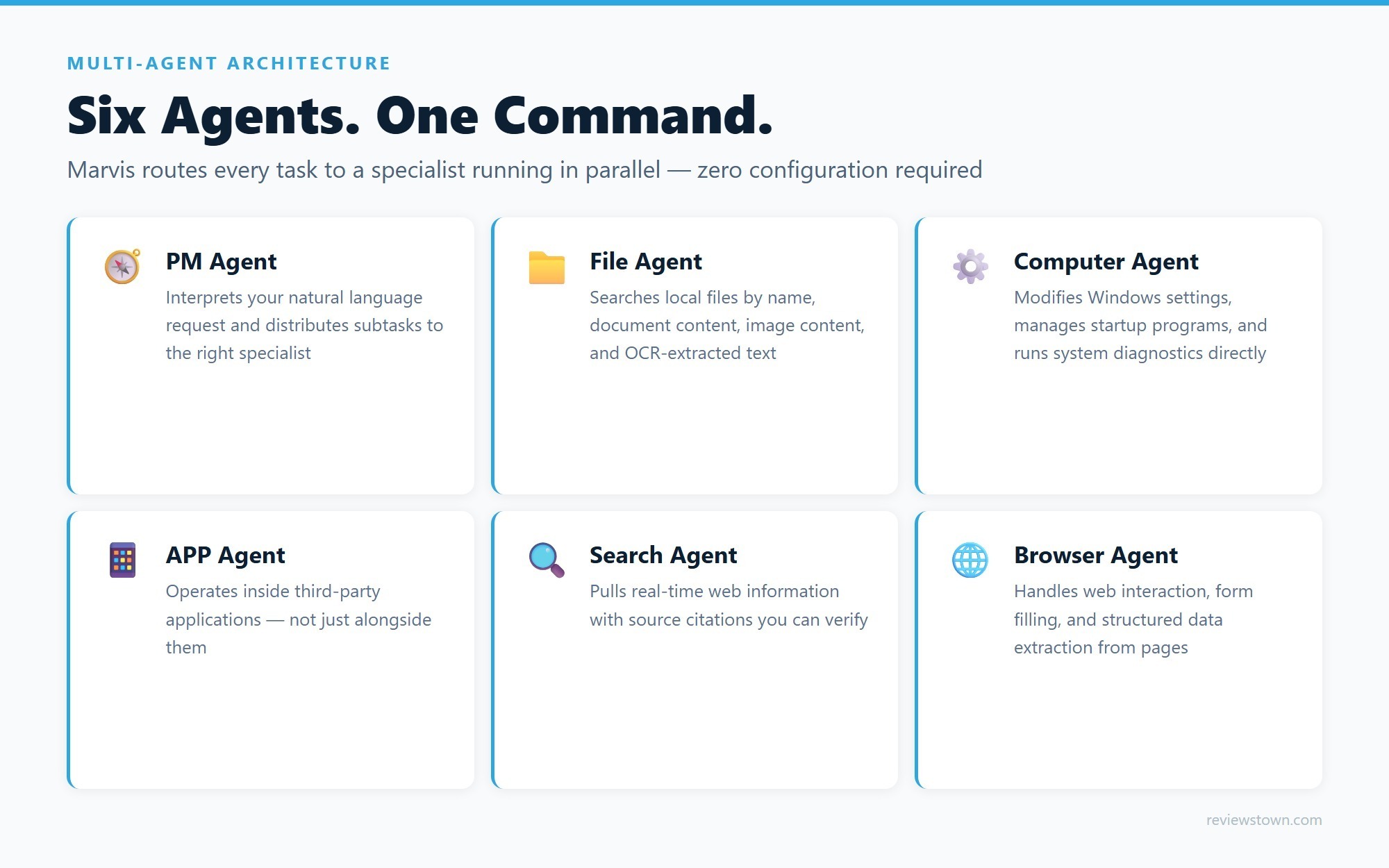
Marvis’s capability set is not monolithic. Under the hood, it uses six discrete AI agents that can operate simultaneously:
- PM Agent – the orchestrator. It interprets your natural language request, decomposes it into subtasks, and routes each subtask to the appropriate specialist.
- File Agent – handles all local storage. It searches files by name, document content, image content (via vision models), and OCR text embedded in scanned PDFs or screenshots.
- Computer Agent – interfaces directly with Windows configuration. It manages startup items, adjusts hardware settings, runs diagnostics, and modifies system preferences without user navigation.
- APP Agent – operates within third-party applications, not just alongside them.
- Search Agent – pulls information from public web sources with citations, so you can verify where any returned fact came from.
- Browser Agent – handles web interaction, form filling, and structured data extraction from pages.
The parallel execution model means that a complex request – “find the PDF I was reading last Tuesday about semiconductor supply chains, extract its key findings, and draft a three-slide summary” – breaks across the File Agent and APP Agent simultaneously, reducing latency compared to a sequential pipeline. This is what AI agent automation looks like in a desktop context: not a single model giving one answer, but a coordinated multi-agent system completing a workflow. For a comparison of how multi-agent systems differ across AI products, see our Kimi K2.5 Agent Swarm review.
File Intelligence: Finding What You Forgot You Had
One of the most practical wins for an agentic AI assistant on the desktop is file retrieval. Knowledge workers routinely lose hours searching for documents saved weeks ago with a half-remembered filename. Windows Search is mediocre at content-level retrieval.
Marvis’s File Agent indexes local storage across four dimensions: filename, document text content, image content (using vision analysis), and OCR-extracted text from embedded images inside PDFs and Office files. Ask “find the graph I made comparing Q3 projections to actuals” – even if that chart exists only as an image inside a spreadsheet – and the File Agent can surface it.
The system also supports document processing tasks: extracting key findings from academic papers, generating charts from raw data, rewriting text for clarity, and converting between formats. These are available through the same conversational interface from day one.
System Control: Windows Settings Without the Menus
The Computer Agent has genuine OS-level write access. Practical examples include:
- Diagnosing slow boot times, identifying offending startup programs, and disabling them in one conversational exchange
- Checking hardware compatibility for a specific game before purchasing
- Modifying display refresh rates, power plans, or network adapter settings through natural language
- Running system health diagnostics and summarizing results in plain English
The experience lowers the barrier for users who find Windows Settings menus unintuitive. You don’t need to know that “startup programs” lives under Task Manager → Startup tab. You say “my PC is slow to start” and the Computer Agent navigates there for you. Do AI PC assistants require technical skills to set up? For Marvis’s core features, the answer is no – the baseline works out of the box.
Automation and Custom Workflows
Beyond reactive assistance, Marvis supports proactive AI agent automation through scheduled tasks. A demonstrated use case: set up an automated check at 9:00 AM daily that pulls real estate listings matching your criteria and sends a summary. This kind of scheduled, multi-step automation – which previously required Zapier, n8n, or custom scripts – is now accessible through a conversational setup.
Marvis also supports a Skill marketplace: curated third-party packages that extend the assistant’s capabilities into domain-specific workflows. The architecture is extensible, which matters for professional users who need specialized automation.
Best practices for automating PC tasks with AI agents:
1. Start with reactive tasks (file search, system diagnostics) to calibrate trust in the agent before enabling write-level automation
2. Use the blacklist feature to exclude sensitive directories from file indexing
3. For scheduled automations that send data externally, review the output in a test run first
4. For Privacy Mode, keep local model weights updated – they require manual updates unlike cloud inference
Cross-Platform Integration: Mobile Meets Desktop
One of Marvis’s more unusual features is bidirectional cross-platform AI assistant functionality between Android phones and Windows PCs.
From the mobile side: you can view your Windows desktop in real time on your phone’s touchscreen and control it directly. This works even when the PC is locked, with an offline cloud mode for temporarily disconnected devices.
From the desktop side: you can control your Android phone’s apps from the PC keyboard and screen – useful for replying to mobile-only messaging apps without picking up your phone.
Practical use cases include remotely installing software on a family member’s computer for support, and running system troubleshooting from across the house without physical access. iOS and macOS support are listed as in development, which will significantly expand the cross-platform story.

Privacy: Local Processing vs. Cloud AI
Marvis offers two operating modes, and the trade-offs between cloud AI and local AI assistants are unusually transparent here.
Efficiency Mode uses cloud inference via Tencent’s Hunyuan model and DeepSeek V4. Your data reaches Tencent’s servers for processing. The advantage is speed and model capability.
Privacy Mode runs the entire inference pipeline on-device. Data never leaves your machine. The system can function offline. For users handling sensitive documents – legal, medical, financial – this is a meaningful architectural distinction, not a marketing checkbox.
Is local AI processing really more secure than cloud-based AI? The honest answer depends on your threat model. As Tom’s Guide has reported on Apple’s on-device AI approach, local processing eliminates the network attack surface and third-party data retention risk – but introduces different risks around maintaining the local model weights and managing the system’s file access permissions. Neither mode is unconditionally safer; they distribute risk differently. TechRadar’s analysis of privacy in AI-powered systems puts it well: the real question is which risks you can control.
Privacy Mode hardware requirements:
– 16+ core CPU
– 32GB RAM
– 16GB GPU VRAM
– 35GB free SSD for local model weights
This effectively restricts full Privacy Mode to workstation-class PCs with a high-end discrete GPU.
Full System Requirements
| Mode | CPU | RAM | GPU VRAM | Storage |
|---|---|---|---|---|
| Efficiency (cloud) | 8-core (6-core planned) | 16GB | Not required | SSD |
| Privacy (local) | 16+ core | 32GB | 16GB | 35GB free SSD |
The free tier includes 20 million tokens daily – enough for typical personal use. Heavy document-processing workflows may approach this ceiling.
How Marvis Compares to Copilot and Other AI PC Assistants
This is the practical question most Windows users will ask.
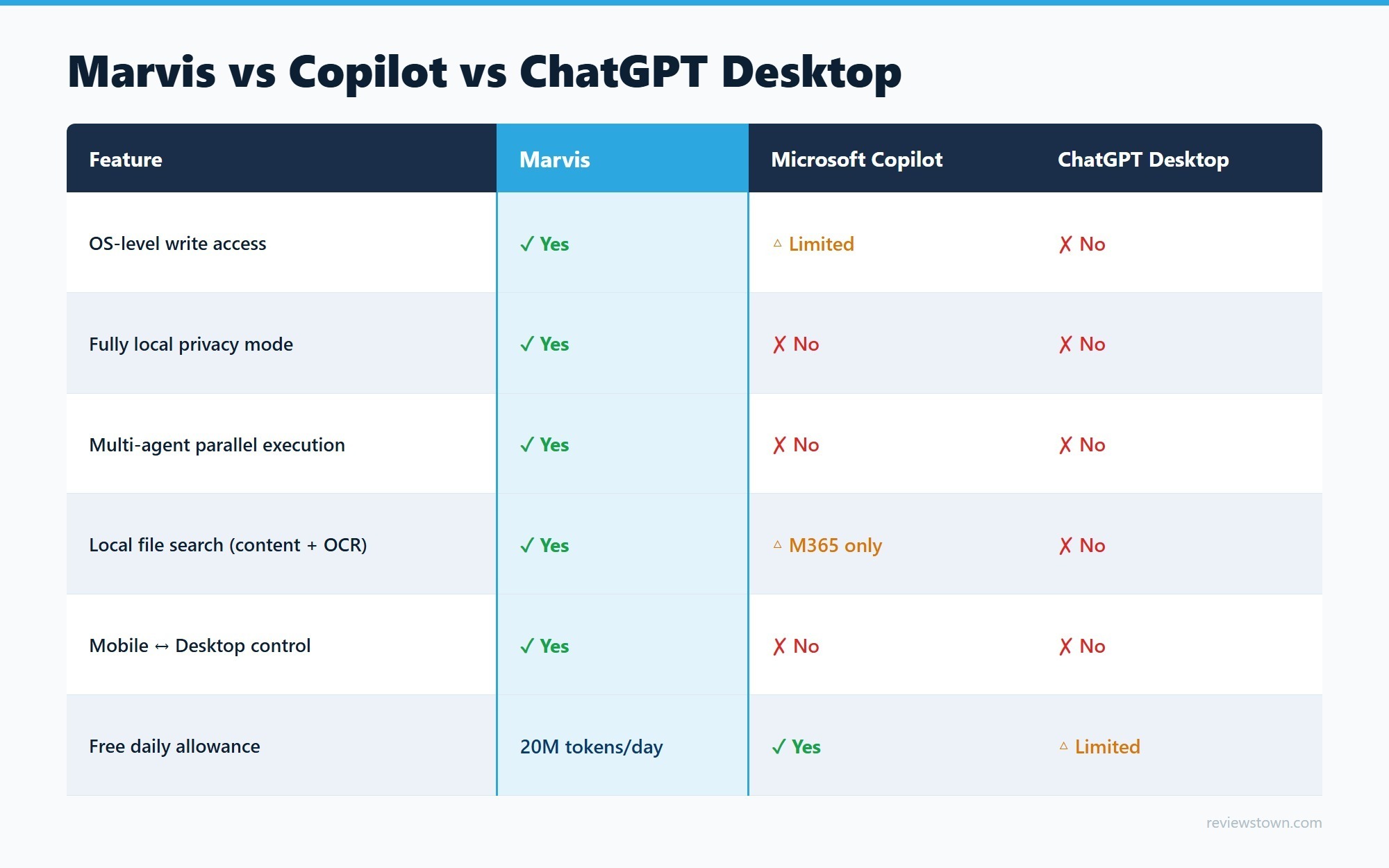
Microsoft Copilot (Windows 11 integrated) can answer questions and perform a limited set of system actions. Its file intelligence relies on Microsoft 365 cloud indexing, which leaves local-only files largely out of reach. It does not offer multi-agent parallel execution or a local privacy mode. Tom’s Guide found Apple Intelligence already outperforms Copilot for everyday tasks – which puts Marvis’s deeper OS integration in sharp relief.
ChatGPT Desktop (OpenAI) offers voice interaction and on-screen context awareness, but lacks deep system-level permissions – it cannot modify startup programs, run hardware diagnostics, or access your local file system with the depth of Marvis’s File Agent.
Apple Intelligence (macOS/iOS) is the closest structural analogue: OS-level, privacy-first, on-device processing as the foundation. But it is Apple-exclusive and unavailable on Windows. Marvis’s cross-platform ambitions (Windows + Android + eventual iOS/macOS) position it as the cross-platform answer to Apple Intelligence’s walled garden. We covered AI capabilities in multimodal tools in our Gemini Omni AI Video Generation review for broader context on where generative AI is heading.
The honest technical edge Marvis holds is system-level write access and parallel multi-agent execution. The honest gap against it is availability: it currently targets Chinese-market users, with English-language deployment timing unclear.
Will AI Assistants Replace Traditional OS Interfaces?
Not immediately, and probably not entirely – but Marvis illustrates the direction.
The traditional OS interface assumes users know where to look. Natural language interfaces assume users know what they want, and let the system figure out where to look. For most users, the second assumption is closer to true most of the time.
The more likely near-term outcome is a layered model: the traditional interface persists for power users and fallback scenarios, while AI agents handle the majority of routine interactions – file retrieval, settings changes, scheduled tasks, cross-device coordination. Marvis’s zero-configuration baseline and parallel agent architecture make a serious technical argument for why that transition is viable at the OS level now, not in five years.
Verdict
Marvis is not a chatbot with a Windows skin. It is a genuinely different category: a private AI assistant for Windows with multi-agent architecture, real system-level access, cross-platform mobile integration, and a credible local-processing privacy mode. The hardware floor for Privacy Mode is high, and availability outside China is still limited. But the architectural decisions – parallel agents, OS-level write permissions, bidirectional mobile-desktop control – set a benchmark that competitors will need to respond to.
For users whose workflows involve heavy local file retrieval, system administration, or cross-device coordination, Marvis is the most technically capable agentic AI assistant currently available on Windows. The question of when it reaches a broad global audience is the one worth watching.
Marvis is currently available for Windows PC and Android. iOS and macOS support are in development. Hardware requirements vary by operating mode.
- Six parallel agents take real action — modify settings, find files, run automations — not just text answers
- Privacy Mode processes everything locally; data never leaves your machine
- Zero-configuration setup for everyday tasks out of the box
- Cross-platform: control Windows PC from Android phone and vice versa
- 20 million tokens per day free allocation covers typical personal use
- Skill marketplace extends agents into domain-specific workflows
- Privacy Mode requires high-end hardware: 32GB RAM, 16GB GPU VRAM, 35GB SSD
- Currently Windows and Android only; iOS and macOS support still in development
- Primarily targets Chinese-market users; English-language availability limited
- UI and task history displayed in Chinese by default
- Search Agent defaults to publicly indexed web data, not private knowledge bases
Frequently Asked Questions
What is an agentic AI assistant?
An agentic AI assistant goes beyond answering questions — it executes tasks autonomously across your system. Where a standard chatbot returns text, an agentic assistant like Marvis modifies Windows settings, searches your local files by content, schedules recurring automations, and operates third-party apps directly. The ‘agentic’ label means the AI takes action, not just advice.
Is there any AI assistant for PC that can actually control system settings?
Yes. Marvis is currently the most capable example: its Computer Agent has OS-level write access, meaning it can disable startup programs, adjust hardware settings, and run system diagnostics through natural language commands — without the user navigating Windows Settings menus. Microsoft Copilot offers a more limited set of system actions but cannot match Marvis’s depth of OS integration.
Which AI assistant is the most private?
Marvis’s Privacy Mode runs the entire inference pipeline on-device using local model weights. Your data never reaches any server. The tradeoff is steep hardware requirements: 32GB RAM, a 16GB VRAM GPU, and 35GB of free SSD. For users with those specs handling sensitive documents, Privacy Mode offers a stronger privacy guarantee than any cloud-based AI assistant.
Can I use Marvis for free?
Yes. Marvis offers 20 million tokens per day on the free tier in Efficiency Mode (cloud processing). For most personal use cases — file searches, system tasks, document summaries — this daily allocation is more than sufficient. Privacy Mode (local processing) has no token limit but requires qualifying hardware.
What is the difference between an AI assistant and agentic AI?
A conventional AI assistant is a conversational interface: you ask, it answers, you act. Agentic AI collapses that last step — the AI itself acts on the answer. Marvis exemplifies this: when you say ‘my PC is slow to boot,’ a chatbot explains why startup programs cause delays; Marvis’s Computer Agent scans your startup list, identifies the culprits, and disables them in the same interaction.